之前才剛將 AppFabric Caching 的開發環境設好,也都 Run 過範例專案都可以正常運作,但今天同事卻遇到無法連接 CacheHost 的問題,而這個問題也很有可能讓許多 AppFabric Caching 新手遭遇相同的困難,因此將此問題解決的過程做個記錄。
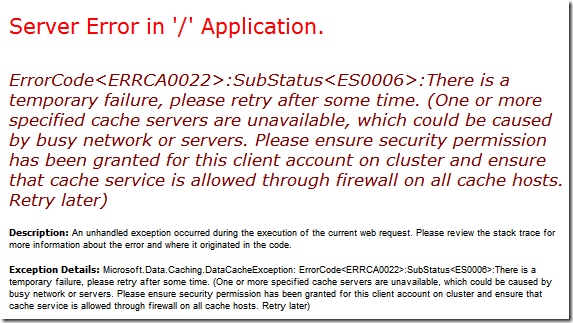
先來看看錯誤訊息的樣子:
ErrorCode<ERRCA0022>:SubStatus<ES0006>:There is a temporary failure, please retry after some time. (One or more specified cache servers are unavailable, which could be caused by busy network or servers. Please ensure security permission has been granted for this client account on cluster and ensure that cache service is allowed through firewall on all cache hosts. Retry later)
由於 AppFabic Caching (Velocity) 一直沒有關於使用權限相關的文件,所以我只好選擇完全關閉安全性檢查的部分,若要關閉安全性檢查,在 Cluster 與 Client 兩端都要配合修改才行:
設定 Cluster 共有 6 個步驟
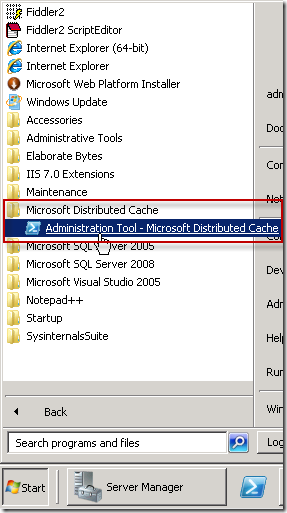
1. 開啟 PowerShell 管理工具
2. 匯出目前的 Cluster 設定檔
Export-CacheClusterConfig -File C:\VelocityConfigExport.xml
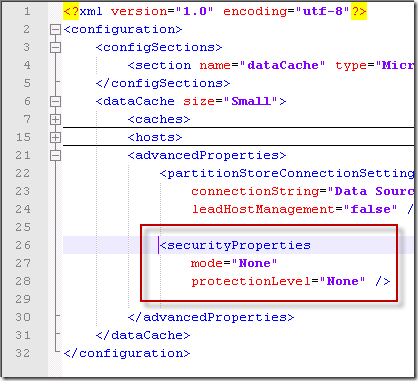
3. 編輯匯出的 Cluster 設定檔,加入如下圖的 <securityProperties> 區段
<securityProperties mode="None" protectionLevel="None" />
4. 停止 Cache Cluster
5. 匯入新的設定檔
Import-CacheClusterConfig -File C:\VelocityConfigExport.xml
6. 啟動 Cache Cluster
設定 Client 執行環境需要調整 new DataCacheFactory 的參數
DataCacheFactory myCacheFactory = new DataCacheFactory(servers, true, true,
    100, DataCacheLocalCacheSyncPolicy.TimeoutBased, 10000, 200,
    new DataCacheSecurity(DataCacheSecurityMode.None, DataCacheProtectionLevel.None));
如果是用 XML 定義 AppFabric Caching 的參數可參考如下:
<securityProperties mode="None" protectionLevel="None" />
<?xml version="1.0" encoding="utf-8"?>
<configuration>
  <configSections>
    <section name="dataCacheClient" type="Microsoft.Data.Caching.DataCacheClientSection, CacheBaseLibrary, Version=1.0.0.0, Culture=neutral, PublicKeyToken=31bf3856ad364e35" />
  </configSections>
  <dataCacheClient deployment="simple">
    <hosts>
      <host name="your.host" cachePort="22233"   cacheHostName="DistributedCacheService" />
    </hosts>
    <advancedProperties>
      <securityProperties mode="None" protectionLevel="None" />
    </advancedProperties>
  </dataCacheClient>
  <runtime>
    <gcServer enabled="true" />
  </runtime>
</configuration>
相關連結