# 如何發送內嵌圖片的 E-mail ( Inline Attachment )
我們在發送 HTML 郵件時,通常會將網頁中的圖片都全部上傳到網站,然後在 E-Mail 內的所有圖片就直接設定絕對網址(Absolute URL)就可以了,但這有個缺點,就是當使用者「看信」的時候如果沒有上網,將會無法看到完整的郵件內容,因為沒網路無法下載圖片。
我們也有另一種選擇,就是將圖片、CSS直接內嵌到郵件中,使用者收到信的時候不會看到有個「附件」在郵件裡,而是直接將圖片顯示在郵件本文裡,又不用上網下載圖片,但唯一的缺點就是每一封郵件的 KB 數會比較大,發送的時候比較暫頻寬。
我在【[System.Web.Mail 太陽春、System.Net.Mail 有問題](/post/2008/02/05/SystemWebMail-too-weak-and-SystemNetMail-has-problem "System.Web.Mail 太陽春、System.Net.Mail 有問題")】這篇文章已經有提到在使用 System.Net.Mail 時最好採用 UTF-8 編碼,雖然不會影響附件檔案的發送,但還是提醒各位要注意字集的問題。
以下是範例程式:
```csharp
using System;
using System.Collections.Generic;
using System.Text;
using System.Net.Mail;
namespace SystemNetMailTest
{
class Program
{
static void Main(string[] args)
{
string myMailEncoding = "utf-8";
string myFromEmail = "testtest.com";
string myFromName = "測試寄件者";
string myToEmail = "testtest.com";
string myToName = "測試收件者";
MailAddress from =
new MailAddress(myFromEmail, myFromName,
Encoding.GetEncoding(myMailEncoding));
MailAddress to =
new MailAddress(myToEmail, myToName,
Encoding.GetEncoding(myMailEncoding));
MailMessage myMessage = new MailMessage(from, to);
myMessage.Subject = "郵件主旨";
myMessage.SubjectEncoding = Encoding.GetEncoding(myMailEncoding);
myMessage.Body = "這是郵件內容
 ";
myMessage.BodyEncoding = Encoding.GetEncoding(myMailEncoding);
myMessage.IsBodyHtml = true;
myMessage.Priority = MailPriority.High;
// 設定附件檔案(Attachment)
string strFilePath = @"C:\Logo.gif";
System.Net.Mail.Attachment attachment1 =
new System.Net.Mail.Attachment(strFilePath);
attachment1.Name = System.IO.Path.GetFileName(strFilePath);
attachment1.NameEncoding = Encoding.GetEncoding(myMailEncoding);
attachment1.TransferEncoding = System.Net.Mime.TransferEncoding.Base64;
// 設定該附件為一個內嵌附件(Inline Attachment)
attachment1.ContentDisposition.Inline = true;
attachment1.ContentDisposition.DispositionType =
System.Net.Mime.DispositionTypeNames.Inline;
myMessage.Attachments.Add(attachment1);
SmtpClient smtp = new SmtpClient("localhost");
try
{
smtp.Send(myMessage);
Console.WriteLine(DateTime.Now.ToString() + " 寄信成功");
}
catch
{
Console.WriteLine(DateTime.Now.ToString() + " 寄信失敗!!!");
}
Console.ReadKey();
}
}
}
```
以上的範例特別要注意的地方就是在使用
";
myMessage.BodyEncoding = Encoding.GetEncoding(myMailEncoding);
myMessage.IsBodyHtml = true;
myMessage.Priority = MailPriority.High;
// 設定附件檔案(Attachment)
string strFilePath = @"C:\Logo.gif";
System.Net.Mail.Attachment attachment1 =
new System.Net.Mail.Attachment(strFilePath);
attachment1.Name = System.IO.Path.GetFileName(strFilePath);
attachment1.NameEncoding = Encoding.GetEncoding(myMailEncoding);
attachment1.TransferEncoding = System.Net.Mime.TransferEncoding.Base64;
// 設定該附件為一個內嵌附件(Inline Attachment)
attachment1.ContentDisposition.Inline = true;
attachment1.ContentDisposition.DispositionType =
System.Net.Mime.DispositionTypeNames.Inline;
myMessage.Attachments.Add(attachment1);
SmtpClient smtp = new SmtpClient("localhost");
try
{
smtp.Send(myMessage);
Console.WriteLine(DateTime.Now.ToString() + " 寄信成功");
}
catch
{
Console.WriteLine(DateTime.Now.ToString() + " 寄信失敗!!!");
}
Console.ReadKey();
}
}
}
```
以上的範例特別要注意的地方就是在使用  的時候,必須要跟在 C# 中設定 attachment1.Name 的設定**一模一樣**才會正確顯示圖片!
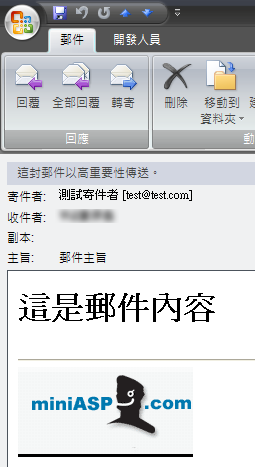
如下圖示,郵件中看的到圖片,但沒有附件的檔案,使用者幾乎沒辦法辨識「內嵌圖檔」與「設定圖片網址」這兩種方式的差異。
> 
相關網址如下:
- System.Net.Mail Namespace
[http://msdn2.microsoft.com/en-us/library/system.net.mail(VS.80).aspx](http://msdn2.microsoft.com/en-us/library/system.net.mail\(VS.80\).aspx)
- Send an Email in C# with Inline attachments
[https://web.archive.org/web/20230929154743/http://blog.devexperience.net/en/12/Send\_an\_Email\_in\_CSharp\_with\_Inline\_attachments.aspx](https://web.archive.org/web/20230929154743/http://blog.devexperience.net/en/12/Send_an_Email_in_CSharp_with_Inline_attachments.aspx)
- Attachment Class
[http://msdn2.microsoft.com/en-us/library/system.net.mail.attachment.aspx](http://msdn2.microsoft.com/en-us/library/system.net.mail.attachment.aspx)
的時候,必須要跟在 C# 中設定 attachment1.Name 的設定**一模一樣**才會正確顯示圖片!
如下圖示,郵件中看的到圖片,但沒有附件的檔案,使用者幾乎沒辦法辨識「內嵌圖檔」與「設定圖片網址」這兩種方式的差異。
> 
相關網址如下:
- System.Net.Mail Namespace
[http://msdn2.microsoft.com/en-us/library/system.net.mail(VS.80).aspx](http://msdn2.microsoft.com/en-us/library/system.net.mail\(VS.80\).aspx)
- Send an Email in C# with Inline attachments
[https://web.archive.org/web/20230929154743/http://blog.devexperience.net/en/12/Send\_an\_Email\_in\_CSharp\_with\_Inline\_attachments.aspx](https://web.archive.org/web/20230929154743/http://blog.devexperience.net/en/12/Send_an_Email_in_CSharp_with_Inline_attachments.aspx)
- Attachment Class
[http://msdn2.microsoft.com/en-us/library/system.net.mail.attachment.aspx](http://msdn2.microsoft.com/en-us/library/system.net.mail.attachment.aspx)