# 如何替網站加入 Open Search 支援
現在的網站通常都會提供搜尋的功能,因此也發展出了一個 "開放式搜尋協定" ( [OpenSearch](http://www.opensearch.org/) ),而所謂的 [OpenSearch](http://www.opensearch.org/) 其實是一個簡單的 XML 格式,用以分享搜尋的結果,或是定義該網站搜尋的方法,讓一些支援 [OpenSearch](http://www.opensearch.org/) 的 [OpenSearch search clients](https://github.com/dewitt/opensearch) 使用,目前支援的瀏覽器有 [Internet Explorer 7](http://www.microsoft.com/windows/ie/) 與 [Firefox 2.0](http://www.mozilla.com/firefox/)+,雖然我自己不常用,但我有同事很愛用,總之多提供一些服務,就多一些用戶摟。
今天我就介紹我的部落格如何加入 [OpenSearch](http://www.opensearch.org/) 的過程,其實非常的容易,只要你的網站本身就有搜尋功能的話,就可以輕易的加上 [OpenSearch](http://www.opensearch.org/) 支援。
第一步,就是先建立一份 [OpenSearch description document](https://github.com/dewitt/opensearch/blob/master/opensearch-1-1-draft-6.md) 文件 ( XML ),像是 [The Will Will Web](/) 網站的 XML 文件格式如下:
```
The Will Will Web
The Will Will Web provider
UTF-8
```
我想光是直接看內容就不用我多說了吧?十分的淺顯易懂。裡面特別要注意的就是 {searchTerms} 變數,這就是用來搜尋你網站內容的關鍵字,透過 HTTP GET 方法傳入 QueryString 進行查詢。
準備好 [OpenSearch description document](https://github.com/dewitt/opensearch/blob/master/opensearch-1-1-draft-6.md) 文件後,可以將該檔案儲存在網站根目錄下,然後在你網站所有網頁內的 與 中加入以下設定:
```
```
其中 **rel** 與 **type** 屬性不能改,剩下的 **href** 就是你網站的 [OpenSearch Description](https://github.com/dewitt/opensearch/blob/master/opensearch-1-1-draft-6.md) 內容網址,**title** 就是你打算使用的顯示名稱。
接著你就可以用 IE7 或 Firefox 連到你的網站,並加入到你的瀏覽器中。
我以 IE7 為例,當你來到我的網站時,點選右上角的 **搜尋提供者** 下拉選單,就會看到一個 **The Will Will Web** 的項目,該項目前面還會多出一個金黃色的圖示,切換過去就可以搜尋了。
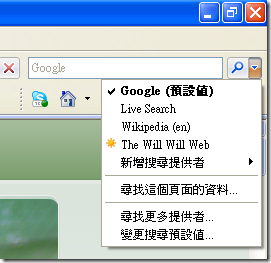
你也可以將該項目直接加入你的 IE 或 Firefox 的搜尋提供者。
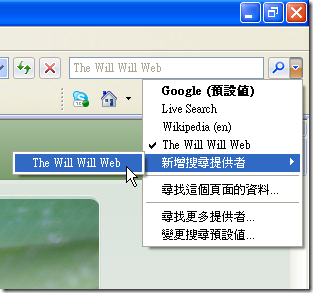 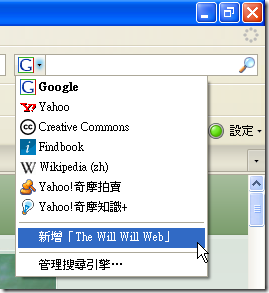
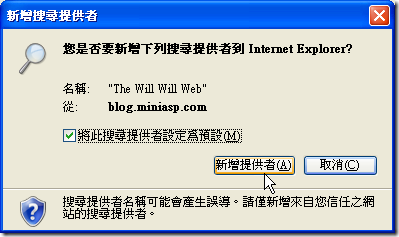
在 IE7 下,我個人當然是勾選「將此搜尋提供者設定為預設」摟。
一個小小的步驟,的確可以給許多人方便呢!
**相關連結**
- [Open Search](http://www.opensearch.org/)
- [OpenSearch Description](https://github.com/dewitt/opensearch/blob/master/opensearch-1-1-draft-6.md)
- [OpenSearch description document](https://github.com/dewitt/opensearch/blob/master/opensearch-1-1-draft-6.md)
- [OpenSearch - Wikipedia, the free encyclopedia](http://en.wikipedia.org/wiki/OpenSearch)
- [OpenSearch 初探](http://www.wowbox.com.tw/blog/article.asp?id=2861)