# PowerCommands 在安裝 VS2008 SP1 後無法正常開啟頁面
其實我 Visual Studio 2008 Service Pack 1 已經安裝很久了,但不知何時開始我的 Visual Studio 只要開啟 \*.aspx 或 \*.master 檔案都會直接掛掉 ( 整個視窗不見 ),找來找去才發現原來是 [PowerCommands](https://web.archive.org/web/20080305012427/http://code.msdn.microsoft.com:80/PowerCommands) 的關係,只要移掉就好了。不過 [PowerCommands](https://web.archive.org/web/20080305012427/http://code.msdn.microsoft.com:80/PowerCommands) 這麼好用,我實在不忍心就這樣移除,最後也找到了解決方法。
### \*\*\* 文章更新 \*\*\*
感謝 Chris Torng 告知標準的解決方法是下載 [Visual Studio and .NET Framework 的 Hotfix](https://connect.microsoft.com/VisualStudio/Downloads/DownloadDetails.aspx?DownloadID=16827&wa=wsignin1.0) 回來安裝既可解決此問題,下載時有好幾個檔案,請依據不同作業系統與CPU架構下載回來安裝,說明如下:
- **NDP20SP2-KB963676-x86.exe Windows XP (x86) 請安裝這個檔案**
- NDP20SP2-KB963676-x64.exe
- NDP20SP2-KB963676-IA64.exe
- **Windows6.0-KB963676-x86.msu Windows Vista/2008 (x86) 請安裝這個檔案**
- **Windows6.0-KB963676-x64.msu Windows Vista/2008 (x64) 請安裝這個檔案**
- Windows6.0-KB963676-ia64.msu
\---
這裡的解決方案僅適用於 [PowerCommands 1.1](https://web.archive.org/web/20080305012427/http://code.msdn.microsoft.com:80/PowerCommands) 版。
要解決這個問題,你必須編輯 Visual Studio 2008 的設定檔
```
C:\Program Files\Microsoft Visual Studio 9.0\Common7\IDE\devenv.exe.config
```
開啟檔案後大約在第12行的地方找到以下這行:
```
```
然後在這一行下面新增一個 dependentAssembly 區段,內容如下:
*備註:預設的* [*PowerCommands*](https://web.archive.org/web/20080305012427/http://code.msdn.microsoft.com:80/PowerCommands) *安裝目錄在 C:\\Program Files\\PowerCommands\\ 目錄下*
```
```
設定完成的畫面大概長這樣:
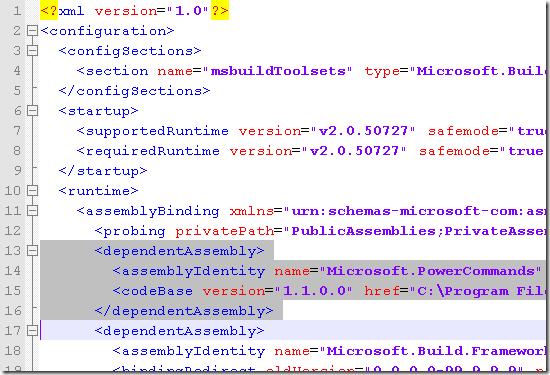
如此一來,你的 [PowerCommands](https://web.archive.org/web/20080305012427/http://code.msdn.microsoft.com:80/PowerCommands) 又可以正常使用了!
**相關連結**
- [Hotfix Available for ASP.NET MVC Crashes With Azure/Power Commands/Resharper](https://devblogs.microsoft.com/dotnet/hotfix-available-for-asp-net-mvc-crashes-with-azurepower-commandsresharper/)
- [KB963676 - Visual Studio and .NET Framework Hotfix](https://connect.microsoft.com/VisualStudio/Downloads/DownloadDetails.aspx?DownloadID=16827&wa=wsignin1.0)
- [PowerCommands for Visual Studio 2008](https://web.archive.org/web/20080305012427/http://code.msdn.microsoft.com:80/PowerCommands)
- [Xaml Editor, Class Explorer Crashes after Visual Studio 2008 SP1](http://social.msdn.microsoft.com/Forums/en-US/vssetup/thread/e2434065-9921-4861-b914-9cc9d6c55553/)
- [介紹好用工具:PowerCommands for Visual Studio 2008](/post/2008/03/06/Useful-tools-PowerCommands-for-Visual-Studio-2008)