# 在 Visual Studio 2010 活用 jQuery 的開發工具使用技巧
我們在日常開發工作當中對於 jQuery 已經非常依賴,幾乎每個大大小小的案子都會用上一些,所以深入瞭解 Visual Studio 2010 能帶來什麼幫助十分重要,妥善的利用開發工具帶來的便利性將可以有效減少開發時間、提升開發效率,今天我就要介紹幾個 Visual Studio 2010 與 jQuery 相關功能、開發技巧與好用工具。
**※ Visual Studio 2010 對於 JavaScript Intellisense 的增強 ※**
這次 Visual Studio 2010 對 JavaScript Intellisense 的支援增強了許多,甚至於對 jQuery 來說簡直可以說是量身打造的,不管你怎麼設定都很容易出現 jQuery 相關的 Intellisense,請參考以下例子:
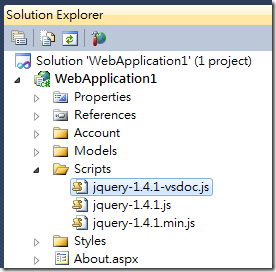
你只要在 MasterPage 載入 jQuery 最小化(minify)的版本,就可以在頁面中享受 Intellsense 的好處:
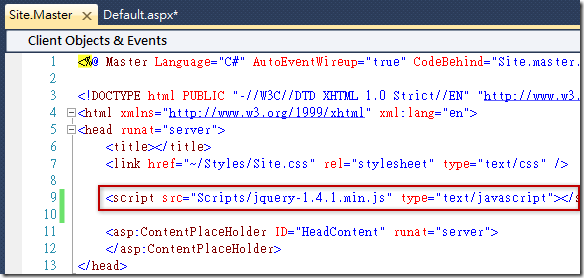
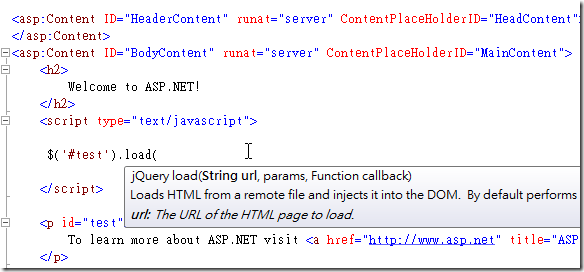
而在未來即將上市的 Visual Studio 2010 中文版,甚至會有全中文的註解說明,是不是佛心來著的!
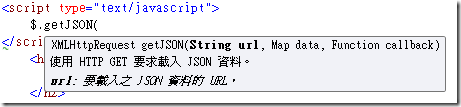
雖然你在 MasterPage 載入的是最小化過的 jQuery 版本,但 Visual Studio 2010 會自動搜尋該檔案所在目錄是否有 jquery-1.4.1-vsdoc.js 檔案,只要一經發現就會自動載入做為 Intellsense 之用。這功能在 Visual Studio 2008 也有提供 Hotfix 可供下載,詳情請見此網頁:[VS2008 SP1 Hotfix to Support "-vsdoc.js" IntelliSense Doc Files](https://devblogs.microsoft.com/dotnet/vs2008-sp1-hotfix-to-support-vsdoc-js-intellisense-doc-files/)
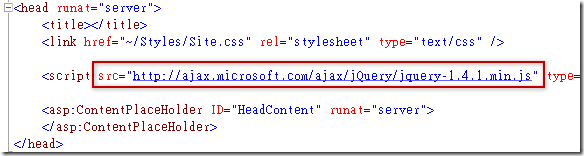
即便你在 MasterPage 中載入的是 [CDN](http://www.asp.net/ajaxlibrary/cdn.ashx) 的 jQuery 版本,只要在專案中有載入同檔名的 jQuery,Visual Studio 2010 一樣能幫你找到適當的 jQuery Intellisense 提示你!
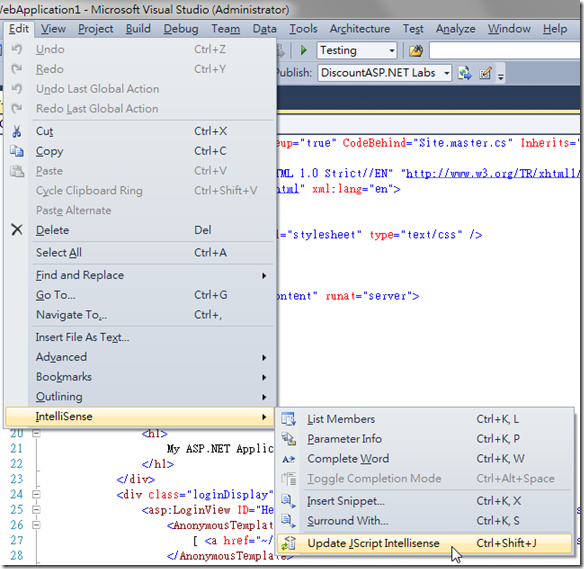
若你發現 jQuery 的 Intellisense 沒有作用的話,可能是 Visual Studio 2010 尚未將專案中所有 JavaScript Library 的 Intellisense 資訊更新,這時你可以利用 Visual Studio 2010 中的 Update JScript Intellisense 功能 ( 快速鍵: **Ctrl + Shift + J** ) 即可立即更新 JavaScript 的 Intellisense 支援。
**※支援 Visual Studio 2010 的 jQuery 程式碼片段 ※**
Visual Studio 2010 對程式碼片段(Code Snippets)功能也增強不少,現在除了在 cs 檔中可以使用 Code Snippets 外,也可以在 HTML/ASPX/JS 檔案中使用 Code Snippets,如果你的游標處於 HTML/ASPX 檔案中的 裡面,Visual Studio 2010 也會自動提示與 JavaScript 相關的 Code Snippets 供您選擇。
首先你可以到 [jQuery Code Snippets for Visual Studio 2010](https://marketplace.visualstudio.com/items?itemName=kspearrin.jQueryCodeSnippets) 下載 jQuery Snippets 安裝檔,目前的 [jQuery Snippets 1.0](https://github.com/kspearrin/Visual-Studio-jQuery-Code-Snippets) 就有提供131 個與 jQuery 有關的 Code Snippets,可說是非常實用,如果你想透過影片感受如何使用,可以參考這則教學影片:[https://web.archive.org/web/20221126195848/https://www.screencast.com/t/YjUyNDVjZD](https://web.archive.org/web/20221126195848/https://www.screencast.com/t/YjUyNDVjZD "http://screencast.com/t/YjUyNDVjZD")。
安裝好之後,你可以試著在頁面的 區塊內輸入 ** **【注意事項】**
>
> 如果你希望在 HTML 中輸入標籤時能自動出現 Code Snippets 的 Intellisense 提示,那麼你必須先輸入一個小於符號 ( **<** ) 才會自動出現提示,否則你也可以按下鍵盤的 **Ctrl + J** 快速鍵也能立即出現 Intellisense 選單。
接著你在到 JavaScript 中輸入 **jq** 開頭就會再提示出可用的 Code Snippets
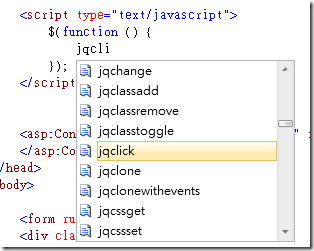
有了這些好用的 Code Snippets 在開發過程中將會變得非常順利,少打一些字也可以減輕手指的負擔。
如果你覺得這些 Code Snippets 的內容過於老舊,你也可以自行修改安裝後的 \*.snippets 檔案,這些檔案都是 XML 格式的文件,很容易看懂如何修改,如需深入研究可參考 [Code Snippets Schema Reference](http://msdn.microsoft.com/en-us/library/ms171418.aspx) 的說明。[jQuery Code Snippets for Visual Studio 2010](https://marketplace.visualstudio.com/items?itemName=kspearrin.jQueryCodeSnippets) 預設的安裝目錄如下:
```
我的文件\Visual Studio 2010\Code Snippets\Visual Web Developer
```
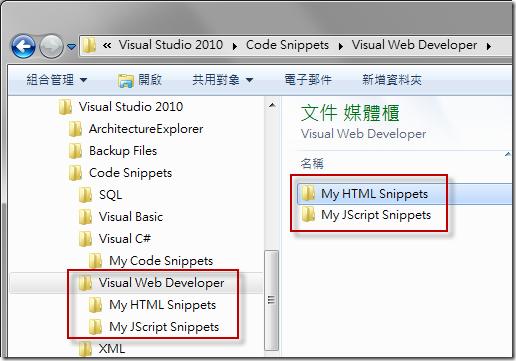
雖然在 CodePlex 上出現了一個感覺還不錯的 [Snippet Designer](https://github.com/mmanela/SnippetDesigner) 工具,但目前還無法支援 HTML 或 JavaScript 類型的 Code Snippets,如果你用此工具編輯這些不支援的類型的 Code Snippets 將會破壞原本的格式而導致 Code Snippets 無法正常使用,所以這點需特別小心。
你還有沒有什麼在 Visual Studio 2010 中與 jQuery 相關的開發技巧呢?歡迎留言分享!^\_^
**相關連結**
- [Downloading jQuery](http://docs.jquery.com/Downloading_jQuery)
- [Microsoft Ajax Content Delivery Network](http://www.asp.net/ajaxlibrary/cdn.ashx)
- [TIPS-為VS2008加入完整jQuery Intellisense](http://blog.darkthread.net/blogs/darkthreadtw/archive/2008/11/09/jquery-intellisense.aspx)
- [VS2008 SP1 Hotfix to Support "-vsdoc.js" IntelliSense Doc Files](https://devblogs.microsoft.com/dotnet/vs2008-sp1-hotfix-to-support-vsdoc-js-intellisense-doc-files/)
- [jQuery Code Snippets for Visual Studio 2010](https://marketplace.visualstudio.com/items?itemName=kspearrin.jQueryCodeSnippets)
- How to Write Your Own Code Snippets
- [Creating and Using IntelliSense Code Snippets](http://msdn.microsoft.com/en-us/library/ms165392.aspx)
- [ASP.NET, HTML, JavaScript Snippet Support (VS 2010 and .NET 4.0 Series)](https://weblogs.asp.net/scottgu/asp-net-html-javascript-snippet-support-vs-2010-and-net-4-0-series)
- [C# Tutorial - Visual Studio Code Snippets](https://web.archive.org/web/20130110105024/http://www.switchonthecode.com:80/tutorials/csharp-tutorial-visual-studio-code-snippets)