# 如何在 ASP․NET Core 3 完整設定 NSwag 與 OpenAPI v3 文件
要設定好一份相對完整的 OpenAPI v3 文件,需要具備相當的知識才能深入理解,本篇文章我將介紹如何在 ASP․NET Core 3.1 環境下設定 NSwag 套件,並且介紹各種設定的詳細說明。
> 2021-06-02: 本文章範例已更新至 .NET 5 版本,但其實兩個版本的設定皆完全相同。
### 基本觀念建立
[NSwag](https://github.com/RicoSuter/NSwag) 是一套相當完整的 Swagger/OpenAPI 工具集,包含了 Swagger(v2)/OpenAPI(v3) 文件產生器,以及視覺化的互動式 Swagger UI 介面。使用 NSwag 時,不一定要先寫好 API 才能產生文件,如果你已經有現成的 OpenAPI 文件,一樣可以透過此工具產生必要的文件或用戶端程式碼(C# 或 TypeScript)。
不過,大部分時候,我們通常還是會先從開發 Web API 開始,然後透過 NSwag 產生 API 文件。在開始之前,你至少要知道幾個個專有名詞:
1. Swagger
早期 [Swagger](https://swagger.io/) 是一家名叫 [SmartBear Software](https://smartbear.com/) 這家公司所發展的開源專案,該工具不但能夠透過 Swagger UI 工具快速一覽目前 .NET 專案的所有 RESTful APIs 清單,還能自動產生文件、用戶端程式碼(C#、TypeScript)、測試案例等等,由於做得太好了,所以在業界被大量採用。
> [Swagger (software) - Wikipedia](https://en.wikipedia.org/wiki/Swagger_\(software\))
2. Swagger API
這是 Swagger 工具的核心,早期 (v1) 是直接透過 Swagger 自行定義出的一份可以描述 RESTful APIs 的規格文件,其格式可以是 YAML 或 JSON 等。
3. OpenAPI
由於 Swagger 太多人使用,後來就成立了一個 [Open API Initiative](https://www.openapis.org/) (OAI) 組織,用來訂定真正業界標準的 API 描述規範,也用更加透明的方式,讓大眾可以直接參與訂定規範,不再隸屬於特定公司下的一個產品。也因此,你常常會看到 Swagger/OpenAPI 諸如此類的寫法,但事實上可能大家在談的其實是同一套產品。建議未來大家盡量都使用 OpenAPI 為主要名稱。
4. OpenAPI v2
從 Swagger API 轉到 [OpenAPI](https://swagger.io/resources/open-api/) 的過程,第一個公開版本為 目前最新版本為 [OpenAPI Specification v2.0](http://spec.openapis.org/oas/v2.0),發佈於 2014 年 09 月 08 日。([GitHub](https://github.com/OAI/openapi-specification/))
5. OpenAPI v3
目前最新版本為 [OpenAPI Specification v3.0.2](http://spec.openapis.org/oas/v3.0.2),發佈於 2018 年 10 月 08 日。([GitHub](https://github.com/OAI/openapi-specification/))
6. Document (文件)
由於 NSwag 會先產生一份 Swagger/Open API specification 規格文件,預設是以 JSON 的格式輸出,網址路徑預設為:`/swagger/v1/swagger.json`
這份文件的內容,原則上全都是由 [AspNetCoreOpenApiDocumentGenerator](https://github.com/RicoSuter/NSwag/wiki/AspNetCoreOpenApiDocumentGenerator) 來負責產生,這當中有相當多可以設定的地方。([AspNetCoreOpenApiDocumentGenerator.cs](https://github.com/RicoSuter/NSwag/blob/master/src/NSwag.Generation.AspNetCore/AspNetCoreOpenApiDocumentGenerator.cs))
7. Operation (操作)
這裡通常泛指每一個 API 操作,在 C# 裡面,其實就是 ASP․NET Core Web API 中**控制器**類別中的**動作**方法(Methods)。
> **注意**:由於 NSwag 不支援 .NET Core 3 的 `System.Text.Json`,因為 `System.Text.Json` 並沒有揭露任何附加資訊以產生 Schemas,所以在 NSwag 內部其實是採用 Newtonsoft.Json 的 Schema 規則!相關討論請參見: [Epic: Support System.Text.Json · Issue #2243 · RicoSuter/NSwag](https://github.com/RicoSuter/NSwag/issues/2243)
### 安裝 NSwag 工具集
要在 ASP․NET Core 中使用 NSwag 的話,必須先安裝 [NSwag.AspNetCore](https://www.nuget.org/packages/NSwag.AspNetCore/) 套件,並且設定 NSwag middleware 才能使用。這個套件包含自動產生 Swagger/OpenAPI 規格的功能,可以自動掃描目前專案中所有 API 控制器中的 Actions,並產生必要的 `swagger.json` 或 `openapi.json` 規格文件。除此之外,也包含了 Swagger UI (v2 and v3) 與 [ReDoc UI](https://github.com/Rebilly/ReDoc) 頁面。
1. 安裝 NSwag.AspNetCore 套件
```bash
dotnet add package NSwag.AspNetCore
```
2. 設定 `Startup.ConfigureServices` 與 `Startup.Configure`
```csharp
public class Startup
{
...
public void ConfigureServices(IServiceCollection services)
{
// Add OpenAPI v3 document
services.AddOpenApiDocument();
// Add Swagger v2 document
// services.AddSwaggerDocument();
}
public void Configure(IApplicationBuilder app, IHostingEnvironment env, ILoggerFactory loggerFactory)
{
...
app.UseOpenApi(); // serve OpenAPI/Swagger documents
app.UseSwaggerUi3(); // serve Swagger UI
app.UseReDoc(config => // serve ReDoc UI
{
// 這裡的 Path 用來設定 ReDoc UI 的路由 (網址路徑) (一定要以 / 斜線開頭)
config.Path = "/redoc";
});
}
}
```
3. 瀏覽 Swagger 文件與與 Swagger UI 頁面
基本上,在 `Startup.ConfigureServices` 與 `Startup.Configure` 不特別設定的情況下,以下網址路徑為預設值:
- Swagger UI: https://localhost:5001/swagger/
- Swagger 規格: https://localhost:5001/swagger/v1/swagger.json
> 請注意:你在輸入 Swagger UI 網址時,請盡量使用 `https://localhost:5001/swagger/` 這個網址,而不要使用像是 `https://localhost:5001/swagger/index.html` 這樣的網址。這是因為當你在一個站台下有多份 OpenAPI 文件的時候,透過 `/swagger/` 會自動載入預設的文件,但 `/swagger/index.html` 就不會自動載入文件。
4. 瀏覽 ReDoc UI 頁面
預設 ReDoc UI 的網址其實是跟 Swagger UI 的網址是一樣的,因此會有點衝突,感覺一次只能使用一套。
- ReDoc UI: https://localhost:5001/swagger/
但我在上述步驟 2 的時候,特別設定了 `app.UseReDoc()` 的 `Path` 屬性,重新設定路由為 `/redoc`,如此一來就不會跟 Swagger UI 的網址衝突,兩套可以同時使用。
- ReDoc UI: https://localhost:5001/redoc/
5. 使用 NSwag 工具集產生用戶端程式碼
- 手動產生程式碼: [NSwagStudio](https://github.com/RicoSuter/NSwag/wiki/NSwagStudio)
- 動態產生程式碼: [NSwag.CodeGeneration.CSharp](https://www.nuget.org/packages/NSwag.CodeGeneration.CSharp/) 或 [NSwag.CodeGeneration.TypeScript](https://www.nuget.org/packages/NSwag.CodeGeneration.TypeScript/)
- 使用命令列工具: [NSwag CLI](https://github.com/RicoSuter/NSwag/wiki/CommandLine) (`nswag run nswag.json`)
- 使用 MSBuild: [NSwag.MSBuild](https://github.com/RicoSuter/NSwag/wiki/NSwag.MSBuild)
- 已連線的服務: [Unchase OpenAPI (Swagger) Connected Service](https://marketplace.visualstudio.com/items?itemName=Unchase.unchaseopenapiconnectedservice)
### 啟用專案的 XML 註解功能
想在 ASP․NET Core 3.1 專案自動產生 [XML 註解](https://learn.microsoft.com/en-us/dotnet/csharp/codedoc)文件,必須要在你的 `*.csproj` 專案檔中設定以下屬性:
```xml
true
$(NoWarn);1591
```
當你設定了 `true` 之後,每次編譯專案都會出現大量的 [CS1591](https://learn.microsoft.com/zh-tw/dotnet/csharp/language-reference/compiler-messages/cs1591) 編譯器警告,建議可以設定 `$(NoWarn);1591` 關閉 `CS1591` 警告訊息。([Visual Studio Disabling Missing XML Comment Warning - Stack Overflow](https://stackoverflow.com/questions/7982525/visual-studio-disabling-missing-xml-comment-warning))
> 上述 `true` 這個設定等同於會將所有 `*.cs` 檔案中的 XML 註解都輸出到 `bin\$(Configuration)\$(TargetFramework)\$(AssemblyName).xml` 檔案中。
以下是在 Web API 中常見的 XML 註解用法:
- 替每個 Operation 的**回應類型**與**狀態碼**提供說明
```csharp
///
/// Creates an order.
///
///
/// Order created.
/// Order invalid.
[HttpPost]
[ProducesResponseType(typeof(int), 201)]
[ProducesResponseType(typeof(IDictionary), 400)]
public IActionResult CreateOrder()
{
return new CreatedResult("/orders/1", 1);
}
```
- 如果回應的內容無法決定類型,例如**下載檔案**,你可以這樣設定:
```csharp
[ProducesResponseType(typeof(IActionResult), 200)]
public IActionResult DownloadFile(string name)
{
....
}
```
- 如果確定不會回應任何內 (HTTP 204 或 HTTP 404),你可以這樣設定:
```csharp
[ProducesResponseType(typeof(void), 204)]
public IActionResult DownloadFile(string name)
{
....
}
```
- 如果有預期的例外發生,可以這樣設定:(*N.B. 不建議直接拋出完整的例外內容*)
```csharp
[HttpPost]
[ProducesResponseType(typeof(int), 200)]
[ProducesResponseType(typeof(LocationNotFoundException), 500)]
public async Task Create([FromBody]Person person)
{
try
{
var location = await _geoService.FindLocationAsync(person.Location);
person.LocationLatitude = location.Latitude;
person.LocationLongitude = location.Longitude;
}
catch (LocationNotFoundException locationNotFoundException)
{
return StatusCode(500, locationNotFoundException);
}
await _dataContext.SaveChangesAsync();
return Ok(person.Id);
}
```
- 變更預設處理 null 回應的行為
基本上,在 .NET 裡面,所有回應 `IActionResult` 或 `ActionResult` 類型都是可以允許回傳 null 的。但是在 Web API 裡面,預設所有 API 回應都是**不允許空值**(Not Null)出現。
當你希望 ASP.NET Core 預設可以接受回傳 `null` 空值,可以在 `services.AddOpenApiDocument()` 裡面做出以下設定:
```csharp
config.DefaultResponseReferenceTypeNullHandling = NJsonSchema.Generation.ReferenceTypeNullHandling.Null;
```
你也可以透過 XML 註解來設定只有 Controller 內的其中一個 Action 允許輸出空值:
```csharp
/// The order.
[HttpGet("~/claims")]
public ActionResult> GetClaims()
{
return Ok(User.Claims.Select(p => new { p.Type, p.Value }));
}
```
> 注意:雖然 C# 有非常多種 XML 註解的表示法,但並非所有 XML 註解都可以正常顯示在 Swagger UI 中。
### 替 Controller/Action/Parameter 加上額外屬性 (Attributes)
你可以在 Controller 或 Action 上面設定一些額外的 Attributes,以改變 OpenAPI 規格文件的定義,這些定義除了可以變更 API 文件的顯示方式外,也可以幫助**用戶端程式碼產生器**產生出更加易懂的程式碼。
- `[OpenApiOperation("GetClaims")]`
用來指定特定一個 API 的**操作名稱**,**操作名稱**會用用在 API 用戶端程式碼產生器中,**操作名稱**會自動成為**方法名稱**。
- `[OpenApiIgnore]`
將特定 API Action 排除在文件之外。
- `[OpenApiTags("foo", "bar")]`
定義操作標籤。參見 [Specify the operation tags](https://github.com/NSwag/NSwag/wiki/AspNetCoreOpenApiDocumentGenerator#specify-the-operation-tags)
當使用 https://localhost:5001/swagger/ 的時候,這裡所定義的 Tags 會變成第一層分類的名稱,如果一個 API 有兩個 Tags,那麼該 API Method 就會重複出現在兩個標籤下。
- `[OpenApiExtensionData("ABC", "123")]`
外加一些 Metadata 到 `openapi.json` 定義中。(可用於用戶端程式碼產生器))
- `[OpenApiBodyParameter("text/json")]`
當沒有用 `[FromBody]` 設定接入參數,使用**程式設計方式**讀取 POST Body 的時候,可以用這個 Attribute 來宣告傳入的資料類型。(少用)
- `[NotNull]` 與 `[CanBeNull]`
可以直接定義在 DTO 類別的屬性、操作參數、回傳型別。
所有 DTO 的屬性,只要是**參考型別**都是 `CanBeNull` 的!
回傳型別的標示方法,是在**操作方法**上寫以下標註,預設所有**操作方法**都是 `NotNull` 的:
```csharp
[return: NJsonSchema.Annotations.CanBeNull]
```
- `[BindRequired]`
只能定義在**操作方法**的參數列上,明確宣告這個參數必須被執行資料繫結,也就是參數必填的意思。
如果用自訂的 ViewModel 來傳參數,預設值就是必填。
更多 [Provided NJsonSchema attributes](https://github.com/RicoSuter/NJsonSchema/wiki/JsonSchemaGenerator#provided-njsonschema-attributes)
- `[OpenApiFile]`
只要你的任何一個 Operation (操作) 使用了以下任何一種型別,預設就會被視為「檔案上傳」的欄位:
- IFormFile
- HttpPostedFile
- HttpPostedFileBase
如果你想將自訂類別標示為檔案上傳,可以透過 `[OpenApiFile]` 來標示:
```csharp
public void MyOperation([OpenApiFile] MyClass myParameter)
{
...
}
```
> 請記得引用 `NSwag.Annotations` 命名空間。
### 同時支援 `OpenAPI v3.0.0` 與 `Swagger v2.0` 文件
目前 NSwag 同時支援 `OpenAPI v3.0.0` 與 `Swagger v2.0` 兩個版本,當你在 `Startup.ConfigureServices` 設定時,選擇其中一個版本即可,建議選擇新版。
雖然同時註冊兩個版本很少見,但如果你要這麼做的話,必須區分不同的 `DocumentName` 才行:
```csharp
services.AddOpenApiDocument(document => document.DocumentName = "a");
services.AddSwaggerDocument(document => document.DocumentName = "b");
```
而且設定 `app.UseSwaggerUi3()` 或 `app.UseReDoc()` 的時候也要指定相對應的 `DocumentName` 屬性,而且 Swagger UI 與 ReDoc UI 的路由位址也必須區隔開來,所以要設定 `Path` 屬性:
```csharp
app.UseOpenApi(config => { config.DocumentName = "a"; });
app.UseSwaggerUi3(config =>
{
config.Path = "/swagger_a";
config.DocumentPath = "/swagger/a/swagger.json";
});
app.UseOpenApi(config => { config.DocumentName = "b"; });
app.UseSwaggerUi3(config =>
{
config.Path = "/swagger_b";
config.DocumentPath = "/swagger/b/swagger.json";
});
```
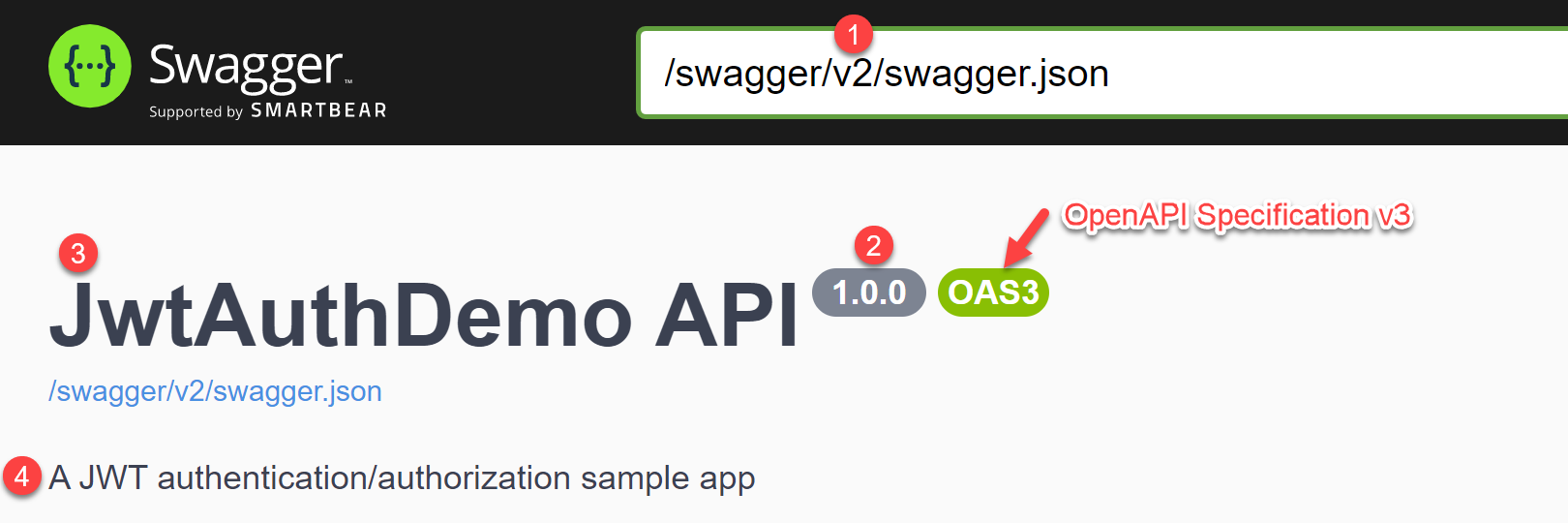
### 在 Swagger UI 加入文件名稱、標題、版本、簡介
當你在 `Startup.ConfigureServices` 設定時,可以加入幾個重要的設定,分別說明如下:
1. `config.DocumentName`
這個設定相當重要,預設值雖然為 `v1`,但其用意並非「版本號」的意思,而是文件名稱,該文件名稱會顯示在網址列上,因為 `app.UseOpenApi()` 預設的路由網址為 `/swagger/{documentName}/swagger.json`,所以預設網址就是 `/swagger/v1/swagger.json`!
如果你改變了 `DocumentName` (文件名稱) 屬性,網址就會改變。
2. `config.Version`
想要設定或變更顯示在 OpenAPI 文件上的 API 版本資訊,可以自行指定版本號碼。
3. `config.Title`
設定文件的顯示標題。
4. `config.Description`
設定文件簡要說明。
以下是設定範例:
```csharp
// add OpenAPI v3 document
services.AddOpenApiDocument(config =>
{
// 設定文件名稱 (重要) (預設值: v1)
config.DocumentName = "v2";
// 設定文件或 API 版本資訊
config.Version = "0.0.1";
// 設定文件標題 (當顯示 Swagger/ReDoc UI 的時候會顯示在畫面上)
config.Title = "JwtAuthDemo";
// 設定文件簡要說明
config.Description = "This is a JWT authentication/authorization sample app";
});
```
### 微調 OpenAPI 規格文件
我們在定義 OpenAPI 規格時,主要有兩個目的:
1. 自動產生完整且清楚的 API 文件 (Swagger UI)
2. 自動產生用戶端程式碼 (API Client code)
而這兩件事,都是由 OpenAPI Specification 為核心,因此你只要建立出一份完整的 OpenAPI 規格文件,就可以達成以上兩個目的。
我們用 Swagger UI 顯示 API 文件的時候,我們可能會希望依據不同的環境顯示不同的 API 文件資訊,例如文件標題可以標示「測試環境」或「預備環境」、變更 API 的基底網址(BaseUrl)等等。
在 NSwag 裡面,你在設定 `app.UseOpenApi()` 的時候,可以調整一個 `PostProcess` 參數,該參數型別為 `Action`,可以讓你在 `services.AddOpenApiDocument();` 設定服務後,還可以動態調整文件內容。
> 請注意:這裡的 `PostProcess` 參數,當使用 `NSwag CLI` 或 `MSBuild` 的時候不會生效,僅適用於 Swagger UI 或 ReDoc UI 瀏覽環境下使用。
- 以下是一份完整的設定範例:
```csharp
app.UseOpenApi(config =>
{
// 這裡的 Path 用來設定 OpenAPI 文件的路由 (網址路徑) (一定要以 / 斜線開頭)
config.Path = "/swagger/v2/swagger.json";
// 這裡的 DocumentName 必須跟 services.AddOpenApiDocument() 的時候設定的 DocumentName 一致!
config.DocumentName = "v2";
config.PostProcess = (document, http) =>
{
if (env.IsDevelopment())
{
document.Info.Title += " (開發環境)";
document.Info.Version += "-dev";
document.Info.Description += "當 API 有問題時,請聯繫 Will 保哥的技術交流中心 粉絲團,我們有專業顧問可以協助解決困難!";
document.Info.Contact = new NSwag.OpenApiContact
{
Name = "Will Huang",
Email = "doggy.huang@gmail.com",
Url = "https://twitter.com/Will_Huang"
};
}
else
{
document.Info.TermsOfService = "https://go.microsoft.com/fwlink/?LinkID=206977";
document.Info.Contact = new NSwag.OpenApiContact
{
Name = "Will Huang",
Email = "doggy.huang@gmail.com",
Url = "https://twitter.com/Will_Huang"
};
}
document.Info.License = new NSwag.OpenApiLicense
{
Name = "The MIT License",
Url = "https://opensource.org/licenses/MIT"
};
};
});
```
- 以下是各種不同的設定範例
- [Sample project: Reverse Proxy Config (.NET Core 2.1)](https://github.com/RicoSuter/NSwag/blob/f052105981cfd899e05249920d950edbbc902504/samples/WithMiddleware/Sample.AspNetCore21.Nginx/Startup.cs)
### 設定身分驗證與授權的 API 文件
在開發 API 的時候,身分認證與授權,不外乎就是 [OAuth2](https://github.com/RicoSuter/NSwag/wiki/AspNetCore-Middleware#add-oauth2-authentication-openapi-3)、[API Key](https://github.com/RicoSuter/NSwag/wiki/AspNetCore-Middleware#enable-api-key-authentication)、[JWT](https://github.com/RicoSuter/NSwag/wiki/AspNetCore-Middleware#enable-jwt-authentication) 等不同做法,請參考連結進行設定即可。
1. 以下是 JWT 驗證授權的設定範例:
```csharp
services.AddOpenApiDocument(config =>
{
var apiScheme = new OpenApiSecurityScheme()
{
Type = OpenApiSecuritySchemeType.ApiKey,
Name = "Authorization",
In = OpenApiSecurityApiKeyLocation.Header,
Description = "Copy this into the value field: Bearer {token}"
};
config.AddSecurity("Bearer", Enumerable.Empty(), apiScheme);
config.OperationProcessors.Add(
new AspNetCoreOperationSecurityScopeProcessor("Bearer"));
});
```
> 請務必將 `config.AddSecurity()` 與 `new AspNetCoreOperationSecurityScopeProcessor()` 都設定為一樣的安全名稱(`Bearer`),如此一來,所有專案內只要有套用 `[Authorize]` 屬性(Attribute)的 API action 都會自動套用 `Bearer` 的安全設定,在線上發送 API 要求時,就會自動送出 Bearer Token。
> 上述設定並不是很好理解技術細節,我是透過反覆閱讀與理解 [AspNetCoreOperationSecurityScopeProcessor.cs](https://github.com/RicoSuter/NSwag/blob/master/src/NSwag.Generation.AspNetCore/Processors/AspNetCoreOperationSecurityScopeProcessor.cs) 原始碼才知道的。
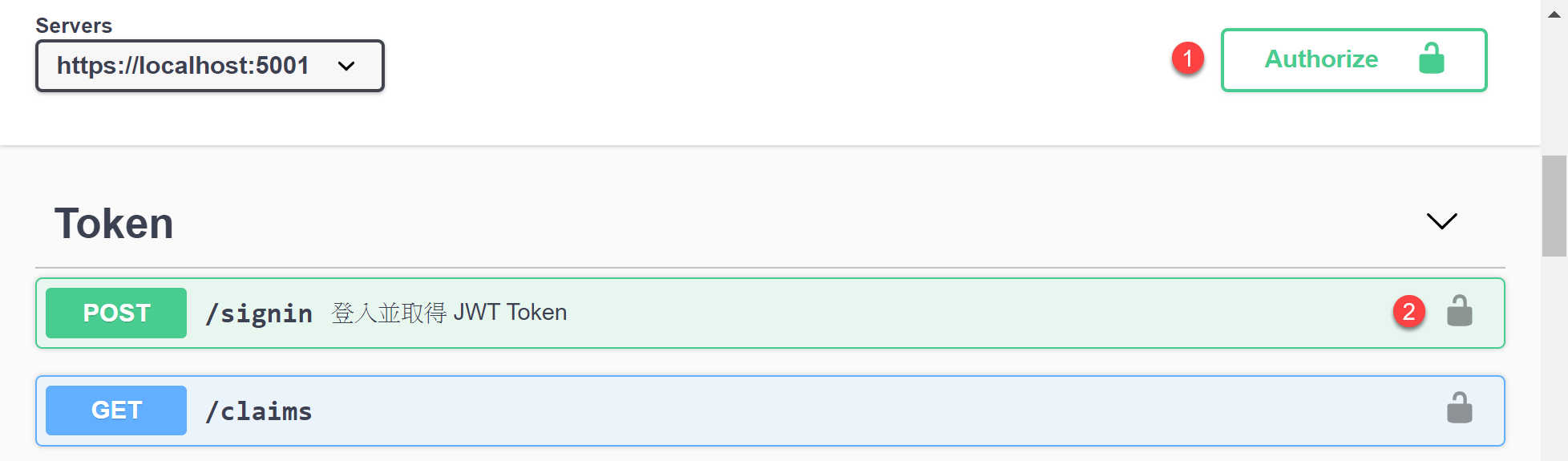
2. 設定好之後,你的 Swagger UI 會有點改變,文件的右上角會出現一個 **Authorize** 按鈕,而且每個 API 右邊也會出現一個「鎖頭」的圖示:
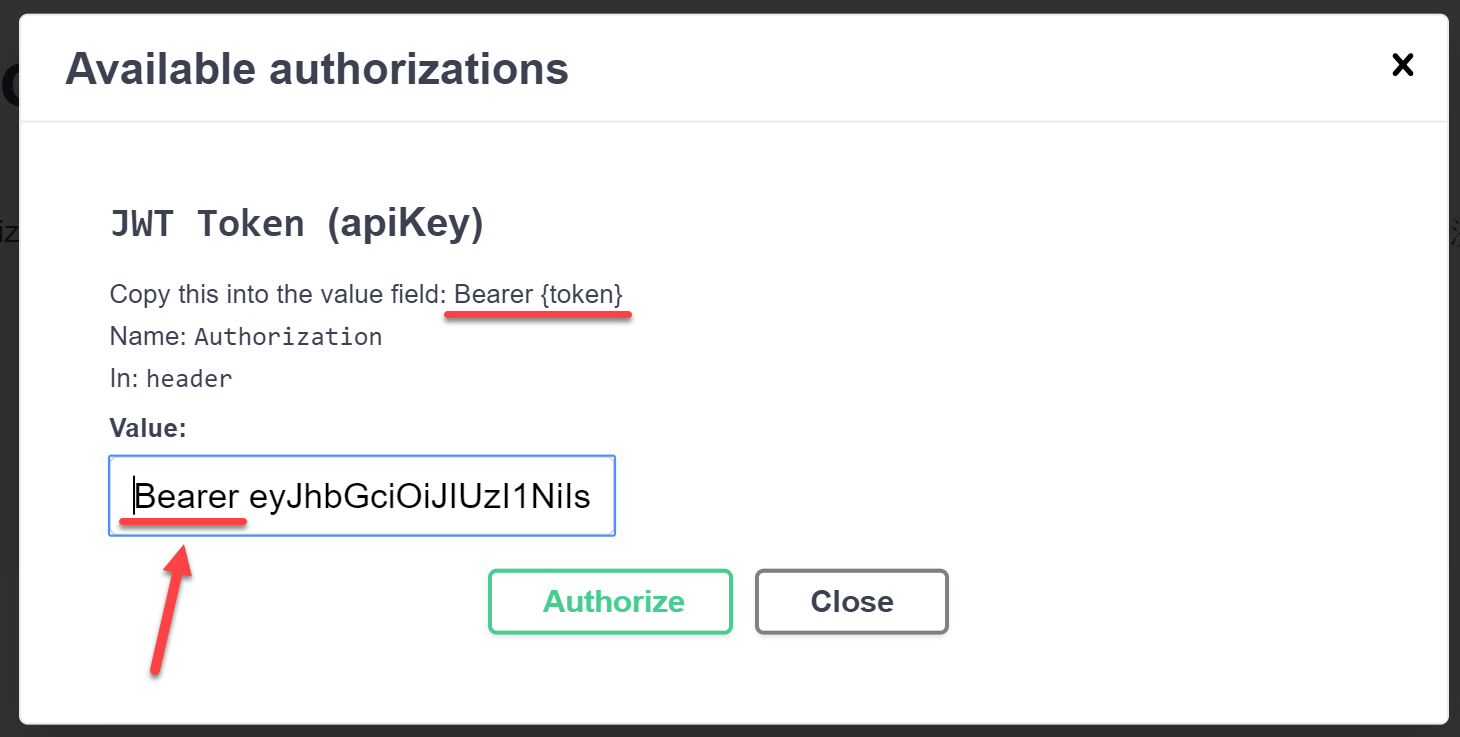
3. 這裡特別要提醒的地方,就是當你按下 **Authorize** 按鈕後,要在對話框內設定 Token 到 Swagger UI 時,必須自己手動輸入 `Bearer` 開頭,加一個空白字元,然後再貼上你的 JWT Token,這樣才能正確設定!
> **2021-06-02 更新**:因為上述設定在 Swagger UI 設定 **Authorize** 的 Token 時,還需要手動加上 `Bearer` 才能正常運作,以下我提供另一種更好的範例。
1. 以下是 JWT 驗證授權的設定範例:
以下範例中,這個 `OpenApiSecurityScheme` 物件請勿加上 `Name` 與 `In` 屬性,否則產生出來的 OpenAPI Spec 格式會有錯誤!
```csharp
services.AddOpenApiDocument(config =>
{
// 這個 OpenApiSecurityScheme 物件請勿加上 Name 與 In 屬性,否則產生出來的 OpenAPI Spec 格式會有錯誤!
var apiScheme = new OpenApiSecurityScheme()
{
Type = OpenApiSecuritySchemeType.Http,
Scheme = JwtBearerDefaults.AuthenticationScheme,
BearerFormat = "JWT", // for documentation purposes (OpenAPI only)
Description = "Copy JWT Token into the value field: {token}"
};
// 這裡會同時註冊 SecurityDefinition (.components.securitySchemes) 與 SecurityRequirement (.security)
config.AddSecurity("Bearer", Enumerable.Empty(), apiScheme);
// 這段是為了將 "Bearer" 加入到 OpenAPI Spec 裡 Operator 的 security (Security requirements) 中
config.OperationProcessors.Add(new AspNetCoreOperationSecurityScopeProcessor());
});
```
如果只想在 Swagger UI 針對特定有套用 `[Authorize]` 的 API 才出現**鎖頭**的話,可以改用以下方法宣告,這樣你就更容易看出哪些 API 才是需要通過 JWT 驗證與授權的:
```csharp
services.AddOpenApiDocument(config =>
{
// 這個 OpenApiSecurityScheme 物件請勿加上 Name 與 In 屬性,否則產生出來的 OpenAPI Spec 格式會有錯誤!
var apiScheme = new OpenApiSecurityScheme()
{
Type = OpenApiSecuritySchemeType.Http,
Scheme = JwtBearerDefaults.AuthenticationScheme,
BearerFormat = "JWT", // for documentation purposes (OpenAPI only)
Description = "Copy JWT Token into the value field: {token}"
};
// 這裡會同時註冊 SecurityDefinition (.components.securitySchemes) 與 SecurityRequirement (.security)
config.AddSecurity("Bearer", apiScheme);
// 這段是為了將 "Bearer" 加入到 OpenAPI Spec 裡 Operator 的 security (Security requirements) 中
config.OperationProcessors.Add(new AspNetCoreOperationSecurityScopeProcessor());
});
```
> 這裡的 `new AspNetCoreOperationSecurityScopeProcessor()` [預設安全名稱](https://github.com/RicoSuter/NSwag/blob/master/src/NSwag.Generation.AspNetCore/Processors/AspNetCoreOperationSecurityScopeProcessor.cs#L26-L28)就是 `Bearer`,因此不用特別設定。但記得 `config.AddSecurity()` 的第一個參數一定要設定成 `Bearer` 才正確。
2. 設定好之後,你的 Swagger UI 會有點改變,文件的右上角會出現一個 **Authorize** 按鈕,而且每個 API 右邊也會出現一個「鎖頭」的圖示:

3. 這裡特別要提醒的地方,就是當你按下 **Authorize** 按鈕後,要在對話框內設定 Token 到 Swagger UI 時,**不需要**自己手動輸入 `Bearer` 開頭,直接貼上你的 JWT Token 就可以了!🔥
### 完整原始碼
我特別製作了一個 ASP․NET Core 3.1 範例專案 (**2021-06-02: 目前專案已經升級到 .NET 5.0 版**),套用本篇文章所提到的大部分用法,應該是相當具有參考價值。
- 網址:[https://github.com/doggy8088/JwtAuthDemo/tree/NSwag](https://github.com/doggy8088/JwtAuthDemo/tree/NSwag)
- 版本差異:[https://github.com/doggy8088/JwtAuthDemo/commit/f6cd98ee038fc800a3d87ab00f0f36603079f593](https://github.com/doggy8088/JwtAuthDemo/commit/f6cd98ee038fc800a3d87ab00f0f36603079f593)
### 相關連結
- [Get started with NSwag and ASP.NET Core | Microsoft Docs](https://learn.microsoft.com/en-us/aspnet/core/tutorials/getting-started-with-nswag?view=aspnetcore-3.1&tabs=netcore-cli)
- NSwag Wikis
- [Home](https://github.com/RicoSuter/NSwag/wiki)
- [Roadmap](https://github.com/RicoSuter/NSwag/wiki/Roadmap)
- NSwag.AspNetCore
- [AspNetCoreOpenApiDocumentGenerator](https://github.com/RicoSuter/NSwag/wiki/AspNetCoreOpenApiDocumentGenerator) (ASP.NET Core Web API)
- [WebApiOpenApiDocumentGenerator](https://github.com/RicoSuter/NSwag/wiki/WebApiOpenApiDocumentGenerator) (ASP.NET Web API)
- [AspNetCore Middleware](https://github.com/RicoSuter/NSwag/wiki/AspNetCore-Middleware)
- [ASP.NET Core API Explorer](https://andrewlock.net/introduction-to-the-apiexplorer-in-asp-net-core/)
- [NSwag.AspNetCore](https://www.nuget.org/packages/NSwag.AspNetCore)
- 注意: NSwag.AspNetCore 13.8.1 以後的版本 Swagger UI 對於使用 Bearer 的 Security Requirements 設定才會正常運作。
- XML 註解
- [AspNetCoreOpenApiDocumentGenerator |> Specify the operation response type and description](https://github.com/RicoSuter/NSwag/wiki/AspNetCoreOpenApiDocumentGenerator#specify-the-operation-response-type-and-description)
- [Documenting your code with XML comments | Microsoft Docs](https://learn.microsoft.com/en-us/dotnet/csharp/codedoc)