# 使用 Windows PowerShell 輸出多行文字應注意的斷行陷阱
我今天遇到了一個棘手問題,原本想透過 PowerShell 寫入一個多行的文字,並放入 Azure Pipelines 執行。這樣的需求我寫過很多次了,不過當下的我突然想不起來確切的語法,所以上網 Google 找到了 [PowerShell Multiline String](https://www.educba.com/powershell-multiline-string/) 這篇文章,看到了一個解決方案,當下沒有多想,複製貼上就套用了,而且測試過確實有效,接著就是一連串的鬼打牆,浪費了寶貴的半小時生命。
### 正確的多行文字字串語法
由於我要輸出的檔案內容是 `Web.config` 檔,這是一份 XML 格式的檔案,所以若用字串串接的話,要靠 `` ` `` 跳脫,所以非常不方便,可讀性也差,因此我直接跳過這個選項。
以下則是我認為最正確的用法,這種語法的名稱叫做 [Here-strings](https://learn.microsoft.com/en-us/powershell/module/microsoft.powershell.core/about/about_quoting_rules?view=powershell-7.2&WT.mc_id=DT-MVP-4015686#here-strings):
1. 完整字串輸出的範本字串語法
記得開頭第一行必須為 `@'` 且結尾行必須為 `'@` 才是正確語法!
```powershell
@'
first line
$(Get-Date)
second line
'@
```
輸出內容如下:
```
first line
$(Get-Date)
second line
```
2. 支援變數內插的範本字串語法
記得開頭第一行必須為 `@"` 且結尾行必須為 `"@` 才是正確語法!
```powershell
@"
first line
$(Get-Date)
second line
"@
```
輸出內容如下:
```
first line
01/25/2022 23:08:25
second line
```
### 悲劇的錯誤用法
我今天不知道哪根筋不對,上網抄了一個我之前沒用過的語法,我有簡易測試過有效,誰知道有地雷!🔥
今天**錯誤的語法**如下:
```powershell
{
} | Out-File 'Web.config' -Encoding UTF8
```
在我的本機測試,輸出的 Web.config 完全沒問題,一開始不知道為何,只要在 Azure Pipelines 上面,輸出的 `Web.config` 就會被加入詭異的斷行字元,非常的詭異,一開始真的很難意識到有這個問題,只覺得為什麼部署到客戶的 IIS 就是無法正常運行!
經過多次嘗試,這才發現我輸出的 Web.config 檔案內容如下,有兩行的語法是無效的,被插入了額外的斷行符號:
```xml
```
當下看到真的是 `WTF` 😡
我在本機測試過很多次,就是無法重現此問題。後來想到或許是 **Windows Terminal** 的關係?我便改用 **Windows PowerShell** 來執行同一段語法,重點是,我依然無法重現問題,真的非常詭異!
由於輸出的文字被強迫斷行,我就懷疑可能跟視窗大小有關,我把 **Windows Terminal** 視窗調的很窄,重跑一次,依然沒有問題。接著我換 **Windows PowerShell** 再次執行同一段語法,但是視窗拉的很窄,這時出現以下結果:
```xml
```
這下終於被我確認出,原來只有在 Windows PowerShell 執行上述命令,才會有被強迫斷行的問題。而我 Azure Pipelines 的 Agents 是跑在 Windows Server 2019 上,預設也是跑在 Windows PowerShell 下,即便 Windows PowerShell 是跑在背景,但還是有個預設寬度,所以跑這段程式時過長的行會直接被截斷,真是意外中的意外,完全出乎我的意料之外,太奇葩、太罕見了!
[這篇文章](https://www.educba.com/powershell-multiline-string/)寫了一個根本不該這樣使用的語法當範例,事後真的很想當面罵他髒話,根本教壞小朋友,文章亂寫一通。(怒)
我後來理解到這個特殊的語法,其實是一段 `ScriptBlock`,原始的目的根本不是用來當成字串用的,請不要把這種程式碼當成範例來寫! (怒氣未消)
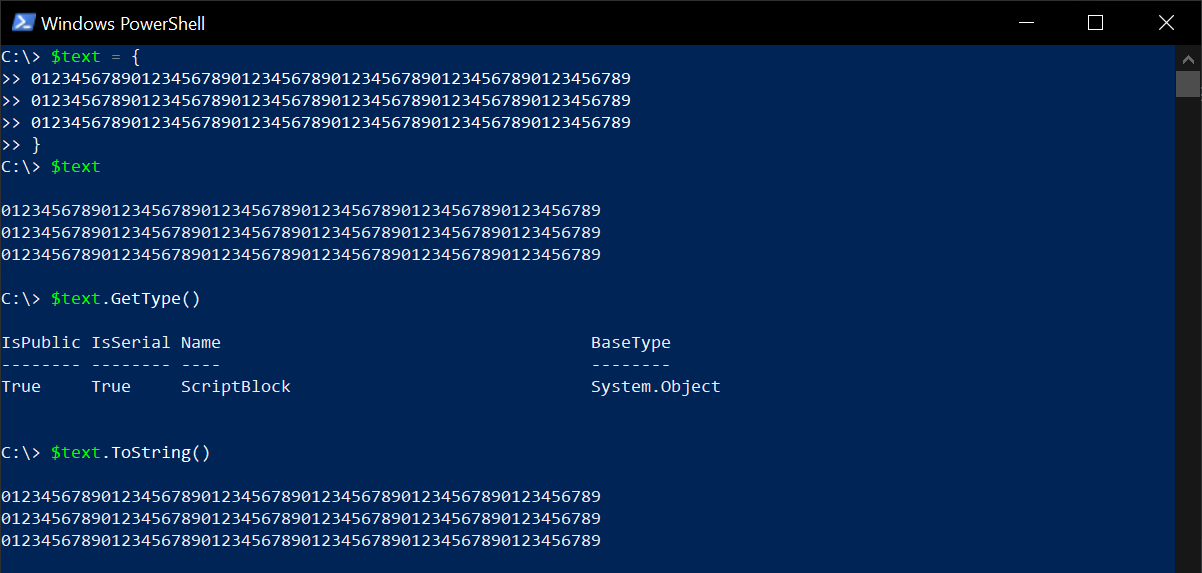
最後再次強調,正確的語法如下:
```powershell
@'
'@ | Out-File 'Web.config' -Encoding UTF8
```
我想我以後不會再忘記了! 😁
### 相關連結
- [about Script Blocks - PowerShell | Microsoft Docs](https://learn.microsoft.com/en-us/powershell/module/microsoft.powershell.core/about/about_script_blocks?view=powershell-7.2&WT.mc_id=DT-MVP-4015686)
- [about Quoting Rules - PowerShell | Microsoft Docs](https://learn.microsoft.com/en-us/powershell/module/microsoft.powershell.core/about/about_quoting_rules?view=powershell-7.2&WT.mc_id=DT-MVP-4015686)
- [Here-strings](https://learn.microsoft.com/en-us/powershell/module/microsoft.powershell.core/about/about_quoting_rules?view=powershell-7.2&WT.mc_id=DT-MVP-4015686#here-strings)