# 如何在 .NET 透過 nuget.config 自訂 NuGet 套件來源
有時候我們會希望從本機硬碟安裝 NuGet 套件,有時候則是想要安裝公司內部發行的 NuGet 套件,我發現許多人都會透過 Visual Studio 去調整全域的 `nuget.config` 設定檔,但這樣很容易造成你在開啟其他不同專案的時候會無法成功還原套件的情況。另一方面,我們在 CI 的環境中,若需要指定自訂的 NuGet 套件來源,通常也都是透過建立 `nuget.config` 的方式來指定。這篇文章我將來說明如何在方案或專案中建立 `nuget.config` 檔案,並將該檔案加入到版控之中。
以下就是在專案中管理 `nuget.config` 的實作過程:
1. 建立全新專案
```bash
dotnet new webapi -n demo1 -minimal
cd demo1
```
2. 查看目前套用的 NuGet 來源
```bash
dotnet nuget list source
```
預設你可以看到以下結果:
```
Registered Sources:
1. nuget.org [Enabled]
https://api.nuget.org/v3/index.json
2. Microsoft Visual Studio Offline Packages [Enabled]
C:\Program Files (x86)\Microsoft SDKs\NuGetPackages\
```
預設全域的 NuGet 設定檔位於: `%AppData%\NuGet\nuget.config`
```xml
```
若用 Visual Studio 查看 NuGet 套件管理員的來源,你會看到以下設定:
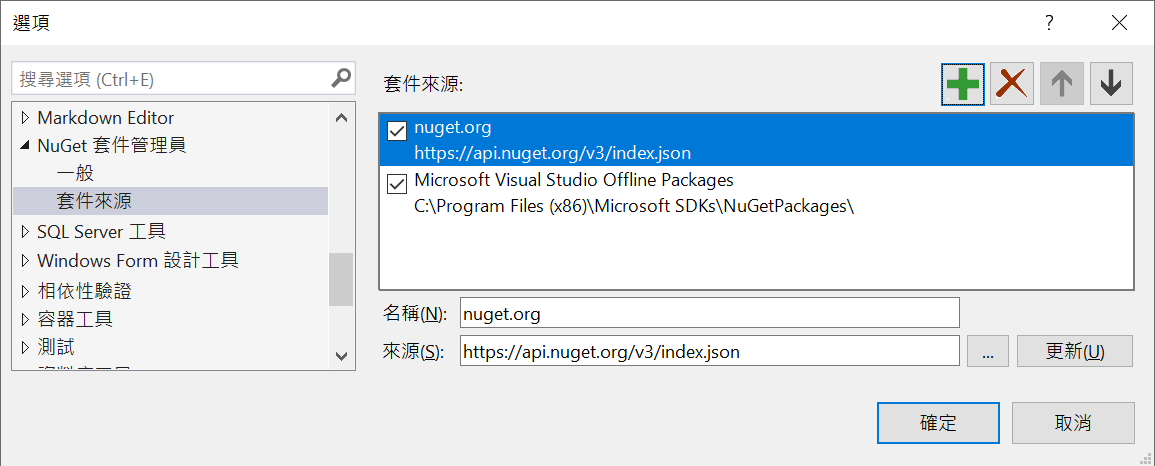
3. 在專案下建立專案專用的 NuGet 設定檔 ( `nuget.config` )
```bash
dotnet new nugetconfig
```
預設將會在當前目錄下建立一個 `nuget.config` 其內容如下:
```xml
```
> 注意: 這裡的 `` 可以用來取消繼承 Global 的 NuGet 設定!
4. 如果你想要優先使用本機路徑或自訂的 NuGet 套件來源,可以這樣設定
```bash
# 先移除預設的 nuget 來源
dotnet nuget remove source nuget
# 將一個本機目錄加入到 nuget.config 設定檔中,並取名為 local
dotnet nuget add source "D:\NuGet" -n local
# 將預設的 nuget 來源加入到專案的 nuget.config 設定檔中
dotnet nuget add source "https://api.nuget.org/v3/index.json" -n nuget
```
5. 查詢調整後的 NuGet 來源清單
```bash
dotnet nuget list source
```
你應該可以看到以下結果:
```
Registered Sources:
1. local [Enabled]
D:\NuGet
2. nuget [Enabled]
https://api.nuget.org/v3/index.json
```
> 注意: 設定完成後,若用 Visual Studio 開啟專案,然後查看 NuGet 套件管理員的來源,你會看到以下設定已更新。但是你完全無法從 Visual Studio 看出這段設定是來自於全域的 `nuget.config` 設定檔,或是方案/專案下自己的 `nuget.config` 設定檔。
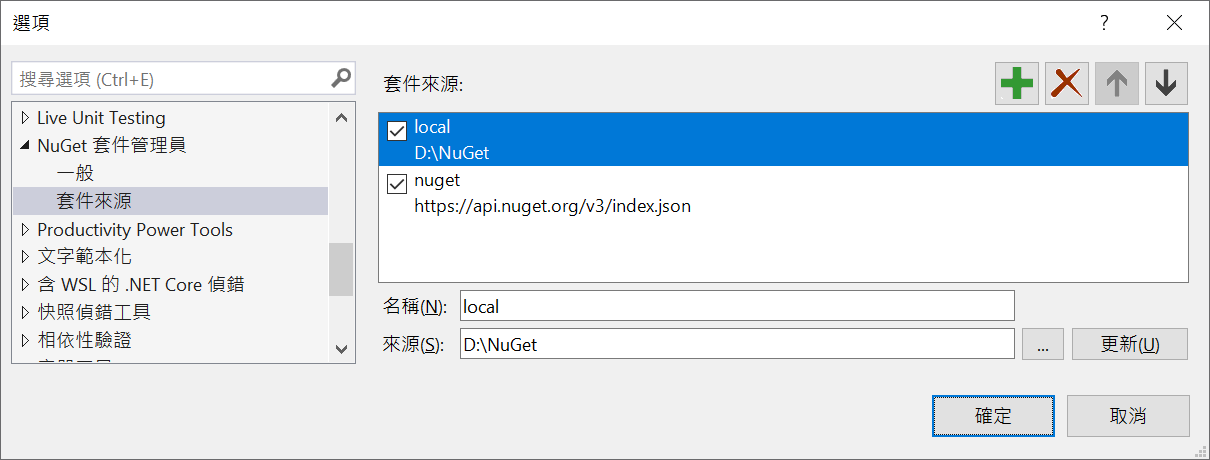
> 注意:請將 `nuget.config` 加入到版控之中,這樣你才能讓所有團隊成員共用一致的 NuGet 來源設定!🔥
### 使用 NuGet.exe 管理 NuGet.config 檔案
由於 .NET SDK 內建一個 `dotnet new nugetconfig` 項目範本,可以快速建立一個預設的 `nuget.config` 設定檔。但是 .NET Framework 就沒有這麼方便了,你可以參考以下步驟進行管理:
1. 先用 [Chocolatey](https://chocolatey.org/install) 安裝 [Nuget.CommandLine](https://community.chocolatey.org/packages/NuGet.CommandLine) 套件
```bash
choco install nuget.commandline -y
```
> 這個命令會安裝 `nuget.exe` 命令列工具。
2. 建立空的 `NuGet.config` 設定檔
```powershell
'' | Out-File NuGet.config -Encoding utf8BOM
```
> 我原本在 NuGet 專案許願增加一個 `nuget --init` 命令,可以讓 .NET Framework 開發者可以快速建立 `NuGet.config` 設定檔,不過目前還沒有實現。參見: [Generate nuget.config file from NuGet CLI #9539](https://github.com/NuGet/Home/issues/9539)
3. 加入需要的 NuGet 來源
```bash
nuget sources add -name local -source D:\NuGet
nuget sources add -name nuget -source https://api.nuget.org/v3/index.json
```
> 如果 `NuGet.config` 檔案格式不正確,會導致上述命令直接改到 `%AppData%\NuGet\nuget.config` 全域設定檔的內容喔!🔥
4. 查看已經生效的 NuGet 來源
```bash
nuget sources
```
你應該可以看到以下結果:
```
Registered Sources:
1. local [Enabled]
D:\NuGet
2. nuget [Enabled]
https://api.nuget.org/v3/index.json
```
> 注意: 你從上述輸出結果完全看不出你套用了哪幾個 `NuGet.config` 設定檔,因為專案的 `NuGet.config` 若沒有加上 `` 的話,預設是會自動繼承全域設定的。
### 相關連結
- [NuGet CLI reference](https://learn.microsoft.com/en-us/nuget/reference/nuget-exe-cli-reference)
- [Chocolatey Software | Nuget.CommandLine 6.0.0](https://community.chocolatey.org/packages/NuGet.CommandLine)
- [如何正確設定 Azure Artifacts 的 NuGet 套件來源 (Feeds) | The Will Will Web](/post/2019/01/16/Setup-Azure-Artifacts-NuGet-Feeds)
- [Generate nuget.config file from NuGet CLI #9539](https://github.com/NuGet/Home/issues/9539)
- [Common NuGet configurations | Microsoft Docs](https://learn.microsoft.com/en-us/nuget/consume-packages/configuring-nuget-behavior#how-settings-are-applied?WT.mc_id=DT-MVP-4015686)
- [sources command (NuGet CLI)](https://learn.microsoft.com/en-us/nuget/reference/cli-reference/cli-ref-sources#options?WT.mc_id=DT-MVP-4015686)