# 使用 Angular 的 HttpClient 可以多利用 HttpParams 簡化查詢字串操作
我們在 Angular 使用 HttpClient 的時候,難免會需要在呼叫時加入 Query String (查詢字串),與其用「組字串」的方式來撰寫,倒不如利用 [HttpParams](https://angular.io/api/common/http/HttpParams) 提供的 API 徹底簡化查詢字串操作,同時也可以提升程式碼的可讀性。這篇文章我就來介紹幾個常見用法。
這裡我使用 [shibe.online](https://shibe.online/) 提供的 API 為例,使用以下網址可以取得 5 張隨機的小狗狗圖片網址:
```
https://shibe.online/api/shibes?count=5&urls=true&httpsUrls=true
```
```json
[
"https://cdn.shibe.online/shibes/e1088cbe3b47f17b4f8bf14d471d815838093518.jpg",
"https://cdn.shibe.online/shibes/acc3d24b89bffce0aedb0f70ae6f5216bc10af6c.jpg",
"https://cdn.shibe.online/shibes/825707a3522141a532adf3b42b9178107df8c8ea.jpg",
"https://cdn.shibe.online/shibes/85c0a4f1910aa43639a1fbc9bdb1460056e265dc.jpg",
"https://cdn.shibe.online/shibes/6c84df4240a51bb9e8292dd10cceadbbb4b7256b.jpg"
]
```
1. 基本 `HttpClient` 用法
```typescript
import { HttpClient, HttpParams } from '@angular/common/http';
import { Component } from '@angular/core';
@Component({
selector: 'shibes',
template: `Shibes
![]() `,
styles: [`h1 { font-family: Lato; }`]
})
export class ShibesComponent {
// https://shibe.online/api/shibes?count=5&urls=true&httpsUrls=true
endpoint = 'https://shibe.online/api/shibes';
querystr = 'count=5&urls=true&httpsUrls=true';
urls1$ = this.http.get(`${this.endpoint}?${this.querystr}`);
constructor(private http: HttpClient) {}
}
```
2. 使用 [`HttpParams`](https://angular.io/api/common/http/HttpParams) 與 [`HttpParamsOptions`](https://angular.io/api/common/http/HttpParamsOptions) 的 `fromString` 載入預設值
```typescript
import { HttpClient, HttpParams } from '@angular/common/http';
import { Component } from '@angular/core';
@Component({
selector: 'shibes',
template: `
`,
styles: [`h1 { font-family: Lato; }`]
})
export class ShibesComponent {
// https://shibe.online/api/shibes?count=5&urls=true&httpsUrls=true
endpoint = 'https://shibe.online/api/shibes';
querystr = 'count=5&urls=true&httpsUrls=true';
urls1$ = this.http.get(`${this.endpoint}?${this.querystr}`);
constructor(private http: HttpClient) {}
}
```
2. 使用 [`HttpParams`](https://angular.io/api/common/http/HttpParams) 與 [`HttpParamsOptions`](https://angular.io/api/common/http/HttpParamsOptions) 的 `fromString` 載入預設值
```typescript
import { HttpClient, HttpParams } from '@angular/common/http';
import { Component } from '@angular/core';
@Component({
selector: 'shibes',
template: `Shibes
![]() `,
styles: [`h1 { font-family: Lato; }`]
})
export class ShibesComponent {
// https://shibe.online/api/shibes?count=5&urls=true&httpsUrls=true
endpoint = 'https://shibe.online/api/shibes';
querystr = 'count=5&urls=true&httpsUrls=true';
httpparams1 = new HttpParams({ fromString: this.querystr });
urls2$ = this.http.get(this.endpoint, { params: this.httpparams1 });
constructor(private http: HttpClient) {}
}
```
3. 使用 [`HttpParams`](https://angular.io/api/common/http/HttpParams) 與 [`HttpParamsOptions`](https://angular.io/api/common/http/HttpParamsOptions) 的 `fromObject` 載入預設值
```typescript
import { HttpClient, HttpParams } from '@angular/common/http';
import { Component } from '@angular/core';
@Component({
selector: 'shibes',
template: `
`,
styles: [`h1 { font-family: Lato; }`]
})
export class ShibesComponent {
// https://shibe.online/api/shibes?count=5&urls=true&httpsUrls=true
endpoint = 'https://shibe.online/api/shibes';
querystr = 'count=5&urls=true&httpsUrls=true';
httpparams1 = new HttpParams({ fromString: this.querystr });
urls2$ = this.http.get(this.endpoint, { params: this.httpparams1 });
constructor(private http: HttpClient) {}
}
```
3. 使用 [`HttpParams`](https://angular.io/api/common/http/HttpParams) 與 [`HttpParamsOptions`](https://angular.io/api/common/http/HttpParamsOptions) 的 `fromObject` 載入預設值
```typescript
import { HttpClient, HttpParams } from '@angular/common/http';
import { Component } from '@angular/core';
@Component({
selector: 'shibes',
template: `Shibes
![]() `,
styles: [`h1 { font-family: Lato; }`]
})
export class ShibesComponent {
// https://shibe.online/api/shibes?count=5&urls=true&httpsUrls=true
endpoint = 'https://shibe.online/api/shibes';
httpparams2 = new HttpParams({ fromObject: { count: 5, urls: true, httpsUrls: true } });
urls3$ = this.http.get(this.endpoint, { params: this.httpparams2 });
constructor(private http: HttpClient) {}
}
```
4. 使用 [`HttpParams`](https://angular.io/api/common/http/HttpParams) 從頭打造查詢字串參數
```typescript
import { HttpClient, HttpParams } from '@angular/common/http';
import { Component } from '@angular/core';
@Component({
selector: 'shibes',
template: `
`,
styles: [`h1 { font-family: Lato; }`]
})
export class ShibesComponent {
// https://shibe.online/api/shibes?count=5&urls=true&httpsUrls=true
endpoint = 'https://shibe.online/api/shibes';
httpparams2 = new HttpParams({ fromObject: { count: 5, urls: true, httpsUrls: true } });
urls3$ = this.http.get(this.endpoint, { params: this.httpparams2 });
constructor(private http: HttpClient) {}
}
```
4. 使用 [`HttpParams`](https://angular.io/api/common/http/HttpParams) 從頭打造查詢字串參數
```typescript
import { HttpClient, HttpParams } from '@angular/common/http';
import { Component } from '@angular/core';
@Component({
selector: 'shibes',
template: `Shibes
![]() `,
styles: [`h1 { font-family: Lato; }`]
})
export class ShibesComponent {
// https://shibe.online/api/shibes?count=5&urls=true&httpsUrls=true
endpoint = 'https://shibe.online/api/shibes';
querystr = 'count=5&urls=true&httpsUrls=true';
httpparams3 = new HttpParams()
.set('count', 5)
.set('urls', true)
.set('httpsUrls', true);
// this.httpparams3.toString() === this.querystr
urls4$ = this.http.get(this.endpoint, { params: this.httpparams3 });
constructor(private http: HttpClient) {}
}
```
5. 使用 [`HttpParams`](https://angular.io/api/common/http/HttpParams) 與 [`HttpParamsOptions`](https://angular.io/api/common/http/HttpParamsOptions) 的綜合用法
```typescript
import { HttpClient, HttpParams } from '@angular/common/http';
import { Component } from '@angular/core';
@Component({
selector: 'shibes',
template: `
`,
styles: [`h1 { font-family: Lato; }`]
})
export class ShibesComponent {
// https://shibe.online/api/shibes?count=5&urls=true&httpsUrls=true
endpoint = 'https://shibe.online/api/shibes';
querystr = 'count=5&urls=true&httpsUrls=true';
httpparams3 = new HttpParams()
.set('count', 5)
.set('urls', true)
.set('httpsUrls', true);
// this.httpparams3.toString() === this.querystr
urls4$ = this.http.get(this.endpoint, { params: this.httpparams3 });
constructor(private http: HttpClient) {}
}
```
5. 使用 [`HttpParams`](https://angular.io/api/common/http/HttpParams) 與 [`HttpParamsOptions`](https://angular.io/api/common/http/HttpParamsOptions) 的綜合用法
```typescript
import { HttpClient, HttpParams } from '@angular/common/http';
import { Component } from '@angular/core';
@Component({
selector: 'shibes',
template: `Shibes
![]() `,
styles: [`h1 { font-family: Lato; }`]
})
export class ShibesComponent {
// https://shibe.online/api/shibes?count=5&urls=true&httpsUrls=true
endpoint = 'https://shibe.online/api/shibes';
httpparams4 = new HttpParams({ fromString: this.querystr })
.set('count', 3);
urls5$ = this.http.get(this.endpoint, { params: this.httpparams4 });
constructor(private http: HttpClient) {}
}
```
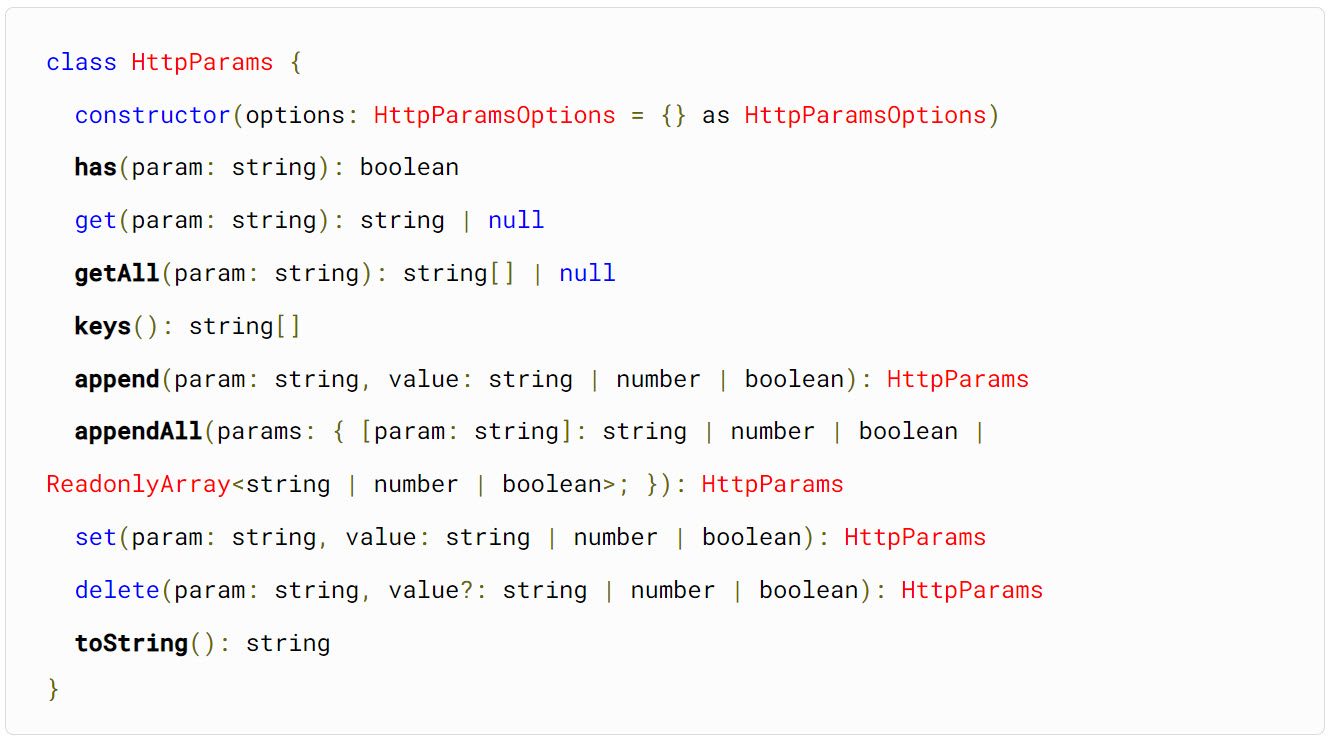
除了 [`HttpParams`](https://angular.io/api/common/http/HttpParams) 的 `set()` API 之外,其實還有以下幾個可用,還蠻方便的! 👍
- `has(param: string): boolean`
- `get(param: string): string | null`
- `getAll(param: string): string[] | null`
- `keys(): string[]`
- `append(param: stringvalue: string | number | boolean): HttpParams`
- `appendAll(params: { [param: string]: string | number | boolean | readonly (string | number | boolean)[]; }): HttpParams`
- `delete(param: string, value?: string | number | boolean): HttpParams`
> 注意: [`HttpParams`](https://angular.io/api/common/http/HttpParams) 物件實體是一個「不可變物件」(immutable object),你在呼叫 `set()`, `append()`, `appendAll()`, `delete()` 方法時,其回傳的 `HttpParams` 都是一個全新的物件實體,並不會影響先前取得的 `HttpParams` 物件,不會有**副作用** (Side-effects)! 👍
### 相關連結
- 本篇文章的範例程式:[https://stackblitz.com/edit/angular-ivy-tebuym?file=src%2Fapp%2Fshibes.component.ts](https://stackblitz.com/edit/angular-ivy-tebuym?file=src%2Fapp%2Fshibes.component.ts)
- [URL Parameters, Query Parameters, httpparams in Angular HttpClient - TekTutorialsHub](https://web.archive.org/web/20250421171214/https://www.tektutorialshub.com/angular/angular-pass-url-parameters-query-strings/)
- [Communicating with backend services using HTTP](https://angular.io/guide/http)
`,
styles: [`h1 { font-family: Lato; }`]
})
export class ShibesComponent {
// https://shibe.online/api/shibes?count=5&urls=true&httpsUrls=true
endpoint = 'https://shibe.online/api/shibes';
httpparams4 = new HttpParams({ fromString: this.querystr })
.set('count', 3);
urls5$ = this.http.get(this.endpoint, { params: this.httpparams4 });
constructor(private http: HttpClient) {}
}
```
除了 [`HttpParams`](https://angular.io/api/common/http/HttpParams) 的 `set()` API 之外,其實還有以下幾個可用,還蠻方便的! 👍
- `has(param: string): boolean`
- `get(param: string): string | null`
- `getAll(param: string): string[] | null`
- `keys(): string[]`
- `append(param: stringvalue: string | number | boolean): HttpParams`
- `appendAll(params: { [param: string]: string | number | boolean | readonly (string | number | boolean)[]; }): HttpParams`
- `delete(param: string, value?: string | number | boolean): HttpParams`
> 注意: [`HttpParams`](https://angular.io/api/common/http/HttpParams) 物件實體是一個「不可變物件」(immutable object),你在呼叫 `set()`, `append()`, `appendAll()`, `delete()` 方法時,其回傳的 `HttpParams` 都是一個全新的物件實體,並不會影響先前取得的 `HttpParams` 物件,不會有**副作用** (Side-effects)! 👍
### 相關連結
- 本篇文章的範例程式:[https://stackblitz.com/edit/angular-ivy-tebuym?file=src%2Fapp%2Fshibes.component.ts](https://stackblitz.com/edit/angular-ivy-tebuym?file=src%2Fapp%2Fshibes.component.ts)
- [URL Parameters, Query Parameters, httpparams in Angular HttpClient - TekTutorialsHub](https://web.archive.org/web/20250421171214/https://www.tektutorialshub.com/angular/angular-pass-url-parameters-query-strings/)
- [Communicating with backend services using HTTP](https://angular.io/guide/http)