# 深入淺出 Apache Maven 的 Plugins 外掛機制
Apache Maven 之所以強大,是因為他有一個強大的 Plugin 執行框架,你任何想讓 Maven 幫你完成的工作,無論是建置(Build)、封裝(Packaging)、產生報表(Reporting)、執行測試(Tests),全部都是透過 Plugins 完成的。它除了內建的核心 Plugins 之外,還有數以百計的第三方 Plugins 可以安裝使用。今天這篇文章我就來介紹一下他的基本架構與使用方式。
### 簡介 Apache Maven Plugins
基本上 Apache Maven 的 Plugins 分成兩大類,並且可以定義在專案的 `pom.xml` 檔案中:
1. 建置外掛 (Build plugins)
用來執行在**建置**(build)過程中的所有大小事,他會定義在 POM 檔的 `` 元素底下。
2. 報表外掛 (Reporting plugins)
用來執行在建立**文件網站**(site)過程中的所有大小事,他會定義在 POM 檔的 `` 元素底下。
由於**報表外掛**(Reporting plugins)的結果會被發佈在**文件網站**(site)上,所以必須考量**多國語系**(internationalized)與**本地化**(localized)的要求。詳見 [Localization of Plugins](https://maven.apache.org/plugins/localization.html) 說明。
Apache Maven 官方支援許多 Plugins,並且詳細列在 [Available Plugins](https://maven.apache.org/plugins/index.html) 頁面中,光是這些內建的 Plugins 就可以幫我們解決 `95%` 以上的建置或報表工作,真的相當厲害且富有內涵,我很難在一篇文章內介紹這麼多 Plugins,只能淺淺帶過,有興趣大家可以個別研究不同的 Plugins。
> 突然覺得可以所有 Plugins 都介紹的話,那就可以參加 [2022 iThome 鐵人賽](https://ithelp.ithome.com.tw/2022ironman/event) 了吧!😅
以下我就列出這些官方支援的 Plugins 清單,大家可以看的大概,有點印象即可:
- 核心外掛 (Core plugins)
| Plugin | 類型 | 摘要說明 |
| --- | --- | --- |
| [compiler](https://maven.apache.org/plugins/maven-compiler-plugin/) | 建置 | Compiles Java sources. |
| [deploy](https://maven.apache.org/plugins/maven-deploy-plugin/) | 建置 | Deploy the built artifact to the remote repository. |
| [failsafe](https://maven.apache.org/surefire/maven-failsafe-plugin/) | 建置 | Run the [JUnit](https://junit.org/junit5/) integration tests in an isolated classloader. |
| [install](https://maven.apache.org/plugins/maven-install-plugin/) | 建置 | Install the built artifact into the local repository. |
| [resources](https://maven.apache.org/plugins/maven-resources-plugin/) | 建置 | Copy the resources to the output directory for including in the JAR. |
| [site](https://maven.apache.org/plugins/maven-site-plugin/) | 建置 | Generate a site for the current project. |
| [surefire](https://maven.apache.org/surefire/maven-surefire-plugin/) | 建置 | Run the [JUnit](https://junit.org/junit5/) unit tests in an isolated classloader. |
| [verifier](https://maven.apache.org/plugins/maven-verifier-plugin/) | 建置 | Useful for integration tests - verifies the existence of certain conditions. |
| [clean](https://maven.apache.org/plugins/maven-clean-plugin/) | 建置 | Clean up after the build. |
- 封裝外掛 (Packaging types/tools)
| Plugin | 類型 | 摘要說明 |
| --- | --- | --- |
| [jar](https://maven.apache.org/plugins/maven-jar-plugin/) | 建置 | Build a [JAR](https://en.wikipedia.org/wiki/JAR_\(file_format\)) (`Java ARchive`) from the current project. |
| [war](https://maven.apache.org/plugins/maven-war-plugin/) | 建置 | Build a [WAR](https://en.wikipedia.org/wiki/WAR_\(file_format\)) (`Web Application Archive`) from the current project. |
| [ear](https://maven.apache.org/plugins/maven-ear-plugin/) | 建置 | Generate an [EAR](https://en.wikipedia.org/wiki/EAR_\(file_format\)) (`Enterprise ARchive`) from the current project. |
| [ejb](https://maven.apache.org/plugins/maven-ejb-plugin/) | 建置 | Build an [EJB](https://en.wikipedia.org/wiki/Jakarta_Enterprise_Beans) (and optional client) from the current project. |
| [rar](https://maven.apache.org/plugins/maven-rar-plugin/) | 建置 | Build a [RAR](https://en.wikipedia.org/wiki/Jakarta_Connectors) (`Resource Adapter Archive`) from the current project. |
| [app-client/acr](https://maven.apache.org/plugins/maven-acr-plugin/) | 建置 | Build a [JavaEE](https://en.wikipedia.org/wiki/Jakarta_EE) application client from the current project. |
| [shade](https://maven.apache.org/plugins/maven-shade-plugin/) | 建置 | Build an [Uber-JAR](https://imagej.net/develop/uber-jars) from the current project, including dependencies. |
| [source](https://maven.apache.org/plugins/maven-source-plugin/) | 建置 | Build a [source-JAR](https://stackoverflow.com/a/30686351/910074) from the current project. |
| [jlink](https://maven.apache.org/plugins/maven-jlink-plugin/) | 建置 | Build Java [Run Time Image](https://openjdk.org/jeps/220). |
| [jmod](https://maven.apache.org/plugins/maven-jmod-plugin/) | 建置 | Build Java [JMod](https://docs.oracle.com/javase/9/tools/jmod.htm) files. |
- 報表外掛 (Reporting plugins)
| Plugin | 類型 | 摘要說明 |
| --- | --- | --- |
| [changelog](https://maven.apache.org/plugins/maven-changelog-plugin/) | 報表 | Generate a list of recent changes from your SCM. |
| [changes](https://maven.apache.org/plugins/maven-changes-plugin/) | 建置+報表 | Generate a report from an issue tracker or a change document. |
| [checkstyle](https://maven.apache.org/plugins/maven-checkstyle-plugin/) | 建置+報表 | Generate a [Checkstyle](https://checkstyle.org/) report. |
| [doap](https://maven.apache.org/plugins/maven-doap-plugin/) | 建置 | Generate a [Description of a Project (DOAP)](https://github.com/ewilderj/doap/wiki) file from a POM. |
| [docck](https://maven.apache.org/plugins/maven-docck-plugin/) | 建置 | Documentation checker plugin. |
| [javadoc](https://maven.apache.org/plugins/maven-javadoc-plugin/) | 建置+報表 | Generate [Javadoc](https://docs.oracle.com/javase/7/docs/technotes/tools/windows/javadoc.html) for the project. |
| [jdeps](https://maven.apache.org/plugins/maven-jdeps-plugin/) | 建置 | Run JDK's [JDeps](https://wiki.openjdk.org/display/JDK8/Java+Dependency+Analysis+Tool) tool on the project. |
| [jxr](https://maven.apache.org/jxr/maven-jxr-plugin/) | 建置 | Generate a source cross reference. |
| [linkcheck](https://maven.apache.org/plugins/maven-linkcheck-plugin/) | 建置 | Generate a [Linkcheck](https://maven.apache.org/plugins/maven-linkcheck-plugin/) report of your project's documentation. |
| [pmd](https://maven.apache.org/plugins/maven-pmd-plugin/) | 建置+報表 | Generate a [PMD](https://pmd.github.io/) report. |
| [project-info-reports](https://maven.apache.org/plugins/maven-project-info-reports-plugin/) | 報表 | Generate standard project reports. |
| [surefire-report](https://maven.apache.org/surefire/maven-surefire-report-plugin/) | 報表 | Generate a report based on the results of unit tests. |
- 工具外掛 (Tools)
| Plugin | 類型 | Description |
| --- | --- | --- |
| [antrun](https://maven.apache.org/plugins/maven-antrun-plugin/) | 建置 | Run a set of ant tasks from a phase of the build. |
| [artifact](https://maven.apache.org/plugins/maven-artifact-plugin/) | 建置 | Manage artifacts tasks like buildinfo. |
| [archetype](https://maven.apache.org/archetype/maven-archetype-plugin/) | 建置 | Generate a skeleton project structure from an [archetype](https://maven.apache.org/archetype/index.html). |
| [assembly](https://maven.apache.org/plugins/maven-assembly-plugin/) | 建置 | Build an assembly (distribution) of sources and/or binaries. |
| [dependency](https://maven.apache.org/plugins/maven-dependency-plugin/) | 建置+報表 | Dependency manipulation (copy, unpack) and analysis. |
| [enforcer](https://maven.apache.org/enforcer/maven-enforcer-plugin/) | 建置 | Environmental constraint checking (Maven Version, JDK etc), User Custom Rule Execution. |
| [gpg](https://maven.apache.org/plugins/maven-gpg-plugin/) | 建置 | Create signatures for the artifacts and poms. |
| [help](https://maven.apache.org/plugins/maven-help-plugin/) | 建置 | Get information about the working environment for the project. |
| [invoker](https://maven.apache.org/plugins/maven-invoker-plugin/) | 建置+報表 | Run a set of Maven projects and verify the output. |
| [jarsigner](https://maven.apache.org/plugins/maven-jarsigner-plugin/) | 建置 | Signs or verifies project artifacts. |
| [jdeprscan](https://maven.apache.org/plugins/maven-jdeprscan-plugin/) | 建置 | Run JDK's JDeprScan tool on the project. |
| [patch](https://maven.apache.org/plugins/maven-patch-plugin/) | 建置 | Use the gnu patch tool to apply patch files to source code. |
| [pdf](https://maven.apache.org/plugins/maven-pdf-plugin/) | 建置 | Generate a PDF version of your project's documentation. |
| [plugin](https://maven.apache.org/plugin-tools/maven-plugin-plugin/) | 建置+報表 | Create a Maven plugin descriptor for any mojos found in the source tree, to include in the JAR. |
| [release](https://maven.apache.org/plugins/maven-release-plugin/) | 建置 | Release the current project - updating the POM and tagging in the SCM. |
| [remote-resources](https://maven.apache.org/plugins/maven-remote-resources-plugin/) | 建置 | Copy remote resources to the output directory for inclusion in the artifact. |
| [scm](https://maven.apache.org/scm/maven-scm-plugin/) | 建置 | Execute SCM commands for the current project. |
| [scm-publish](https://maven.apache.org/plugins/maven-scm-publish-plugin/) | 建置 | Publish your Maven website to a scm location. |
| [scripting](https://maven.apache.org/plugins/maven-scripting-plugin/) | 建置 | The Maven Scripting Plugin wraps the Scripting API according to JSR223. |
| [stage](https://maven.apache.org/plugins/maven-stage-plugin/) | 建置 | Assists with release staging and promotion. |
| [toolchains](https://maven.apache.org/plugins/maven-toolchains-plugin/) | 建置 | Allows to share configuration across plugins. |
| [wrapper](https://maven.apache.org/plugins/maven-wrapper-plugin/) | 建置 | Download and unpack the maven wrapper distribution |
> 除了 Maven 官方支持的 Plugins 外,還有個 [MojoHaus Maven Plugins Project](https://www.mojohaus.org/) 由社群維護了一系列好用的 [Plugins](https://www.mojohaus.org/plugins.html),有空的時候去翻看看,搞不好有意外之喜。在這個 MojoHaus 的世界裡所稱呼的 `Mojo` ([Maven plain Old Java Object](https://maven.apache.org/plugin-developers/index.html)) 通常是指 Plugin 中的某個 Goal 實作,很多 Plugin 的 Goal 在實作的時候也會以 `___Mojo` 結尾,來當成 Goal 的方法名稱,是一種 Maven plugins 常見的命名規則。我們其實經常會在許多文件中看到這個單字,而這個 `Mojo` 單字有「魔力」、「魅力」等含意!
### 認識 Maven 的建置生命週期(`lifecycle`)、階段(`phase`)與目標(`goal`)
在 Maven 裡面有許多「抽象概念」經常會混淆著初學者,因為你只要沒有認真看懂這些概念,根本就無法好好的使用 Maven 這套優異的建置工具。
首先,你要先知道 Maven 定義了三種不同的**生命週期**,彼此相關而不重複:
1. `default`
處理專案的**建置**(build)與**部署**(deployment)等工作
2. `clean`
處理專案的清理工作,將建置過程中產生的檔案清除
3. `site`
處理專案文件網站的產生工作
你從官網的 [Lifecycles Reference](https://maven.apache.org/ref/3.8.1/maven-core/lifecycles.html) 文件可以發現,每個不同的**生命週期**(`lifecycle`)分別定義了一系列依序執行的**階段**(`phase`),這些**階段**是 Maven 依據過往數十年的最佳實務整理出來的寶貴經驗。
請注意,這些所謂的「生命週期」與「階段」都只是個「概念」而已,所代表意義是:
1. 當你想要**建置**與**部署**時 (`default`),你必須依據 Maven 所定義的**階段**來執行任務
```xml
validate
initialize
generate-sources
process-sources
generate-resources
process-resources
compile
process-classes
generate-test-sources
process-test-sources
generate-test-resources
process-test-resources
test-compile
process-test-classes
test
prepare-package
package
pre-integration-test
integration-test
post-integration-test
verify
install
deploy
```
2. 當你想要**清理**時 (`clean`),你必須依據 Maven 所定義的**階段**來執行任務
```xml
pre-clean
clean
post-clean
org.apache.maven.plugins:maven-clean-plugin:2.5:clean
```
3. 當你想要**建立文件網站**時 (`site`),你必須依據 Maven 所定義的**階段**來執行任務
```xml
pre-site
site
post-site
site-deploy
org.apache.maven.plugins:maven-site-plugin:3.3:site
org.apache.maven.plugins:maven-site-plugin:3.3:deploy
```
> 請注意: 所有的**階段**(`phase`)其名稱都是不重複的。
瞭解了這些**生命週期**與**階段**的概念之後,你就必須知道,所有的 Java 專案都可以依據實際的需求來定義**特定階段**(`phase`)要執行什麼樣的**目標**(`goal`)!
所以,**生命週期**(`lifecycle`)與**階段**(`phase`)就只是個**概念**(Concepts),而**目標**(`goal`)才是你真正要做的事情 (要達成的目標)!
我用一個非常簡單的例子來說明:
1. 我們用以下命令建立一個全新的 Java 專案
```powershell
mvn archetype:generate -B `
'-DarchetypeCatalog=internal' `
'-DgroupId=com.duotify' `
'-DartifactId=demo1' `
'-Dversion=1.0-SNAPSHOT'
```
由於 Maven 預設會採用 `org.apache.maven.archetypes:maven-archetype-quickstart:1.0` 這個專案範本(`archetype`),所以不用寫底下這段較長的命令:
```powershell
mvn archetype:generate -B `
'-DarchetypeCatalog=internal' `
'-DgroupId=com.duotify' `
'-DartifactId=demo1' `
'-Dversion=1.0-SNAPSHOT' `
'-DarchetypeGroupId=org.apache.maven.archetypes' `
'-DarchetypeArtifactId=maven-archetype-quickstart' `
'-DarchetypeVersion=1.0'
```
這只是一個非常簡單的 Console 專案:
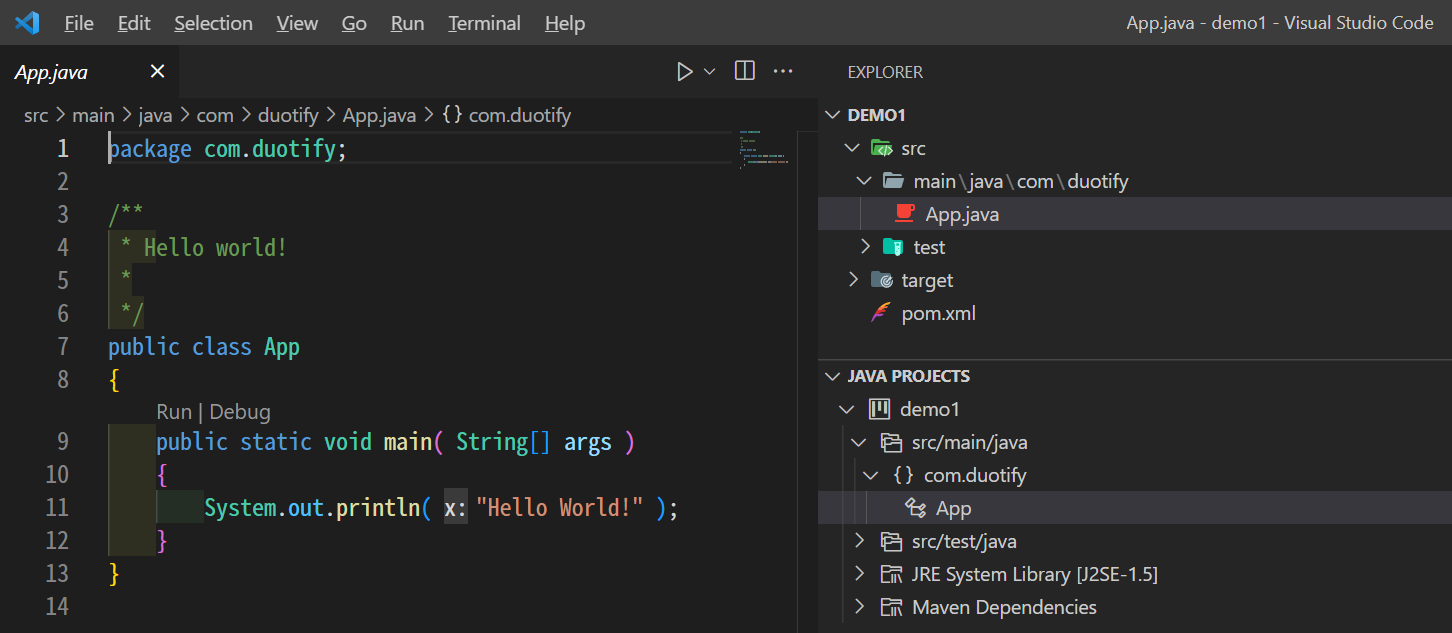
其 `pom.xml` 檔案內容如下:
```xml
4.0.0
com.duotify
demo1
jar
1.0-SNAPSHOT
demo1
http://maven.apache.org
junit
junit
3.8.1
test
```
2. 然後我們直接執行 `mvn` 命令,並獲取以下錯誤訊息
```
[INFO] Total time: 0.133 s
[INFO] Finished at: 2022-09-11T18:04:06+08:00
[INFO] ------------------------------------------------------------------------
[ERROR] No goals have been specified for this build. You must specify a valid lifecycle phase or a goal in the format : or :[:]:. Available lifecycle phases are: validate, initialize, generate-sources, process-sources, generate-resources, process-resources, compile, process-classes, generate-test-sources, process-test-sources, generate-test-resources, process-test-resources, test-compile, process-test-classes, test, prepare-package, package, pre-integration-test, integration-test, post-integration-test, verify, install, deploy, pre-clean, clean, post-clean, pre-site, site, post-site, site-deploy. -> [Help 1]
[ERROR]
[ERROR] To see the full stack trace of the errors, re-run Maven with the -e switch.
[ERROR] Re-run Maven using the -X switch to enable full debug logging.
[ERROR]
[ERROR] For more information about the errors and possible solutions, please read the following articles:
[ERROR] [Help 1] http://cwiki.apache.org/confluence/display/MAVEN/NoGoalSpecifiedException
```
這裡的重點在這段:
> No `goals` have been specified for this build. You must specify `a valid lifecycle phase` or `a goal` in the format `:` or `:[:]:`. Available lifecycle phases are: `validate`, `initialize`, `generate-sources`, `process-sources`, `generate-resources`, `process-resources`, `compile`, `process-classes`, `generate-test-sources`, `process-test-sources`, `generate-test-resources`, `process-test-resources`, `test-compile`, `process-test-classes`, `test`, `prepare-package`, `package`, `pre-integration-test`, `integration-test`, `post-integration-test`, `verify`, `install`, `deploy`, `pre-clean`, `clean`, `post-clean`, `pre-site`, `site`, `post-site`, `site-deploy`.
這段英文應該不難理解,你必須在 `mvn` 命令後面指定一個 `phase` 或 `goal` 才能執行 Maven!
3. 假設我們只要編譯目前的專案,那我們可以指定 `compile` 這個**階段**
```bash
mvn compile
```
> 上述命令執行時會掛掉,容後補充說明。
由於這個 `compile` **階段**隸屬於 `default` 生命週期,因此 Maven 就會從 `default` 生命週期的第一個 `phase` 開始找尋是否有相對應的**目標**(`goal`)需要達成。
所以 Maven 會依序去查找 `validate`, `initialize`, `generate-sources`, `process-sources`, `generate-resources`, `process-resources`, `compile` 這幾個**階段**是否有相對應的**目標**(`goal`)去執行程式。
基本上,整個 Maven 就是這樣跑起來的!👍
此時重點就要登場了,所以我們所說的**目標**(`goal`)具體來說到底是什麼呢?
### 理解 Plugin 與 Goal 之間的關係
事實上,我們註冊到 `pom.xml` 的每一個 Plugins,裡面分別都「實作」了一個到多個**目標**(`goals`),而這些 Plugin 裡面的**目標**(`goals`)會明確綁定到特定**階段**(`phase`),當 Maven 執行到該**階段**(`phase`)的時候,就會自動執行這個 Plugin 的**目標**(`goal`)。說穿了,所謂的**目標**(`goal`)就是一個類別中的**方法**而已。
> 一般來說,在 Plugin 裡面的**目標名稱**(`goal name`)經常會跟**階段名稱**(`phase name`)刻意設計的一樣,這樣也比較好辨識,但這並不是必要條件。
我以 [Apache Maven Compiler Plugin](https://maven.apache.org/plugins/maven-compiler-plugin/) 為例,這個 Plugin [實作了 3 個目標](https://maven.apache.org/plugins/maven-compiler-plugin/plugin-info.html):
1. [compiler:compile](https://maven.apache.org/plugins/maven-compiler-plugin/compile-mojo.html)
用來綁定 `compile` phase 並用來編譯 Java **主程式**的原始碼(`src/main/**`)。
2. [compiler:testCompile](https://maven.apache.org/plugins/maven-compiler-plugin/testCompile-mojo.html)
用來綁定 `test-compile` phase 並用來編譯 Java **測試程式**的原始碼(`src/test/**`)。
3. [compiler:help](https://maven.apache.org/plugins/maven-compiler-plugin/help-mojo.html)
用來顯示這個 `compiler` plugin 的使用說明。
> 幾乎所有 Plugin 都會實作 `help` 這個目標(`goal`),方便開發人員查詢相關用法。你可以執行 `mvn compiler:help` 查詢相關用法。
有趣的地方在於,在官網的 [Plugin Documentation](https://maven.apache.org/plugins/maven-compiler-plugin/plugin-info.html) 文件中,並沒有明確跟你說這些 Goal 要怎樣使用、用在哪裡,這些細節已經被定義在 Maven 的生命週期(`lifecycle`)、階段(`phase`)與目標(`goal`)之中了。因此你若沒有先建立好完整且清晰的概念,就會無法理解 Maven 的運作原理。
我們接續上一段的例子,當我們執行 `mvn compile` 命令的時候,實際上完整的流程如下:
1. 先選中 `compile` 階段(`phase`),藉此判斷出 `default` 這個生命週期(`lifecycle`)
2. 依序執行 `default` 生命週期(`lifecycle`)的每個階段(`phase`)
1. 找尋所有 Plugins 中是否有**實作**並**綁定**任何名稱為 `validate` 階段(`phase`)的目標(`goal`)
2. 找尋所有 Plugins 中是否有**實作**並**綁定**任何名稱為 `initialize` 階段(`phase`)的目標(`goal`)
3. 找尋所有 Plugins 中是否有**實作**並**綁定**任何名稱為 `generate-sources` 階段(`phase`)的目標(`goal`)
4. 找尋所有 Plugins 中是否有**實作**並**綁定**任何名稱為 `process-sources` 階段(`phase`)的目標(`goal`)
5. 找尋所有 Plugins 中是否有**實作**並**綁定**任何名稱為 `generate-resources` 階段(`phase`)的目標(`goal`)
6. 找尋所有 Plugins 中是否有**實作**並**綁定**任何名稱為 `process-resources` 階段(`phase`)的目標(`goal`)
7. 找尋所有 Plugins 中是否有**實作**並**綁定**任何名稱為 `compile` 階段(`phase`)的目標(`goal`)
如此一來 `mvn compile` 命令便執行完畢!
由於 `compile` plugin 是 Maven 的核心 plugins 之一,所以預設就會註冊在 `pom.xml` 之中,不用特別設定,而上述過程只有 `compile` 這個目標(`goal`)有被比對中,因此到 `compile` 這個階段(`phase`)的時候,就會跑去執行 `compile:compile` 目標(`goal`)。
如果我直接執行 `mvn compile:compile` 的話,就代表我們執行的是 `compile` 這個 plugin 的 `compile` 目標而已,不會去執行其他階段(phase),因此也不會去執行其他 Plugins 中的任何目標。
所以 `mvn compile` 與 `mvn compile:compile` 所代表的**意義**是截然不同的!
### 解決無法編譯的問題
我先前有提到,這個範例專案其實無法編譯,你在執行 `mvn compile` 的時候會發現以下訊息:
```
[INFO] Scanning for projects...
[INFO]
[INFO] -------------------------< com.duotify:demo1 >--------------------------
[INFO] Building demo1 1.0-SNAPSHOT
[INFO] --------------------------------[ jar ]---------------------------------
[INFO]
[INFO] --- maven-resources-plugin:2.6:resources (default-resources) @ demo1 ---
[WARNING] Using platform encoding (MS950 actually) to copy filtered resources, i.e. build is platform dependent!
[INFO] skip non existing resourceDirectory G:\Projects\demo1\src\main\resources
[INFO]
[INFO] --- maven-compiler-plugin:3.1:compile (default-compile) @ demo1 ---
[INFO] Changes detected - recompiling the module!
[WARNING] File encoding has not been set, using platform encoding MS950, i.e. build is platform dependent!
[INFO] Compiling 1 source file to G:\Projects\demo1\target\classes
[INFO] -------------------------------------------------------------
[ERROR] COMPILATION ERROR :
[INFO] -------------------------------------------------------------
[ERROR] Source option 5 is no longer supported. Use 7 or later.
[ERROR] Target option 5 is no longer supported. Use 7 or later.
[INFO] 2 errors
[INFO] -------------------------------------------------------------
[INFO] ------------------------------------------------------------------------
[INFO] BUILD FAILURE
[INFO] ------------------------------------------------------------------------
[INFO] Total time: 0.991 s
G:\Projects\demo1>mvn compile:compile
[INFO] Scanning for projects...
Downloading from central: https://repo.maven.apache.org/maven2/org/apache/maven/plugins/maven-metadata.xml
Downloading from central: https://repo.maven.apache.org/maven2/org/codehaus/mojo/maven-metadata.xml
Downloaded from central: https://repo.maven.apache.org/maven2/org/apache/maven/plugins/maven-metadata.xml (14 kB at 14 kB/s)
Downloaded from central: https://repo.maven.apache.org/maven2/org/codehaus/mojo/maven-metadata.xml (21 kB at 21 kB/s)
[INFO] ------------------------------------------------------------------------
[INFO] BUILD FAILURE
[INFO] ------------------------------------------------------------------------
[INFO] Total time: 1.733 s
[INFO] Finished at: 2022-09-11T18:40:45+08:00
[INFO] ------------------------------------------------------------------------
[ERROR] No plugin found for prefix 'compile' in the current project and in the plugin groups [org.apache.maven.plugins, org.codehaus.mojo] available from the repositories [local (C:\Users\wakau\.m2\repository), central (https://repo.maven.apache.org/maven2)] -> [Help 1]
[ERROR]
[ERROR] To see the full stack trace of the errors, re-run Maven with the -e switch.
[ERROR] Re-run Maven using the -X switch to enable full debug logging.
[ERROR]
[ERROR] For more information about the errors and possible solutions, please read the following articles:
[ERROR] [Help 1] http://cwiki.apache.org/confluence/display/MAVEN/NoPluginFoundForPrefixException
```
你可以從上述訊息得知,其實這個 `mvn compile` 在執行的過程中,執行了 `2` 個目標:
1. `maven-resources-plugin:2.6:resources`
2. `maven-compiler-plugin:3.1:compile`
而在執行 `maven-compiler-plugin:3.1:compile` 目標時,卻發生了以下錯誤:
```
[ERROR] Source option 5 is no longer supported. Use 7 or later.
[ERROR] Target option 5 is no longer supported. Use 7 or later.
```
首先,看起來 Maven 內建的 `maven-compiler-plugin` 選用了 `3.1` 版本有點過於老舊,他預設使用 `Java 5` 來編譯原始碼,但我的電腦裝的是 `JDK 17`,編譯器最低支援版本從 `Java 7` 開始支援,所以才會編譯失敗。
要解決這個問題其實很簡單,只要在專案的 `pom.xml` 加入這個 `maven-compiler-plugin` plugin 並提供選項設定即可。
我打算加入以下 XML 片段到 `pom.xml` 檔案中,藉此指定最新版的 `maven-compiler-plugin` plugin:
```xml
...
maven-compiler-plugin
3.10.1
...
```
再重新執行一次 `mvn compile` 就會發現專案已經可以成功建置!
> 其實為了讓建置過程可以更穩定,一般來說我們會明確指定各個 Plugins 的版本資訊(`3.10.1`),否則當 Plugin 版本變化時,若是遇到**破壞性更新**(Breaking changes)那就遭了!
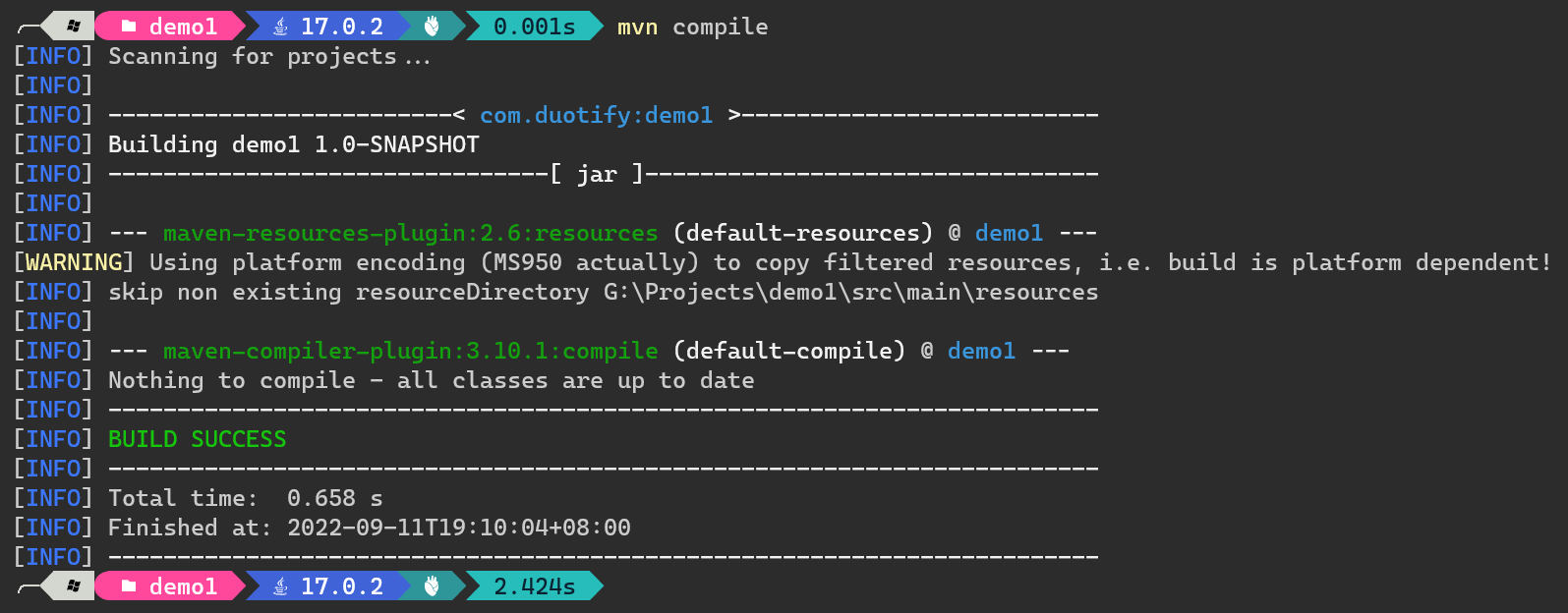
除了指定 `maven-compiler-plugin` plugin 到最新版本外,你也可以透過 plugin 的 `` 來指定參數,讓 `maven-compiler-plugin` 可以選用 `1.7` 當成我們的原始碼版本,這樣也能讓專案順利編譯成功!
```xml
...
maven-compiler-plugin
8
8
...
```
再重新執行一次 `mvn compile` 或 `mvn clean compile` 也會發現專案依然可以成功建置!
> 注意: 執行 `mvn clean compile` 命令意味著先執行 `clean` 階段,再執行 `compile` 階段!
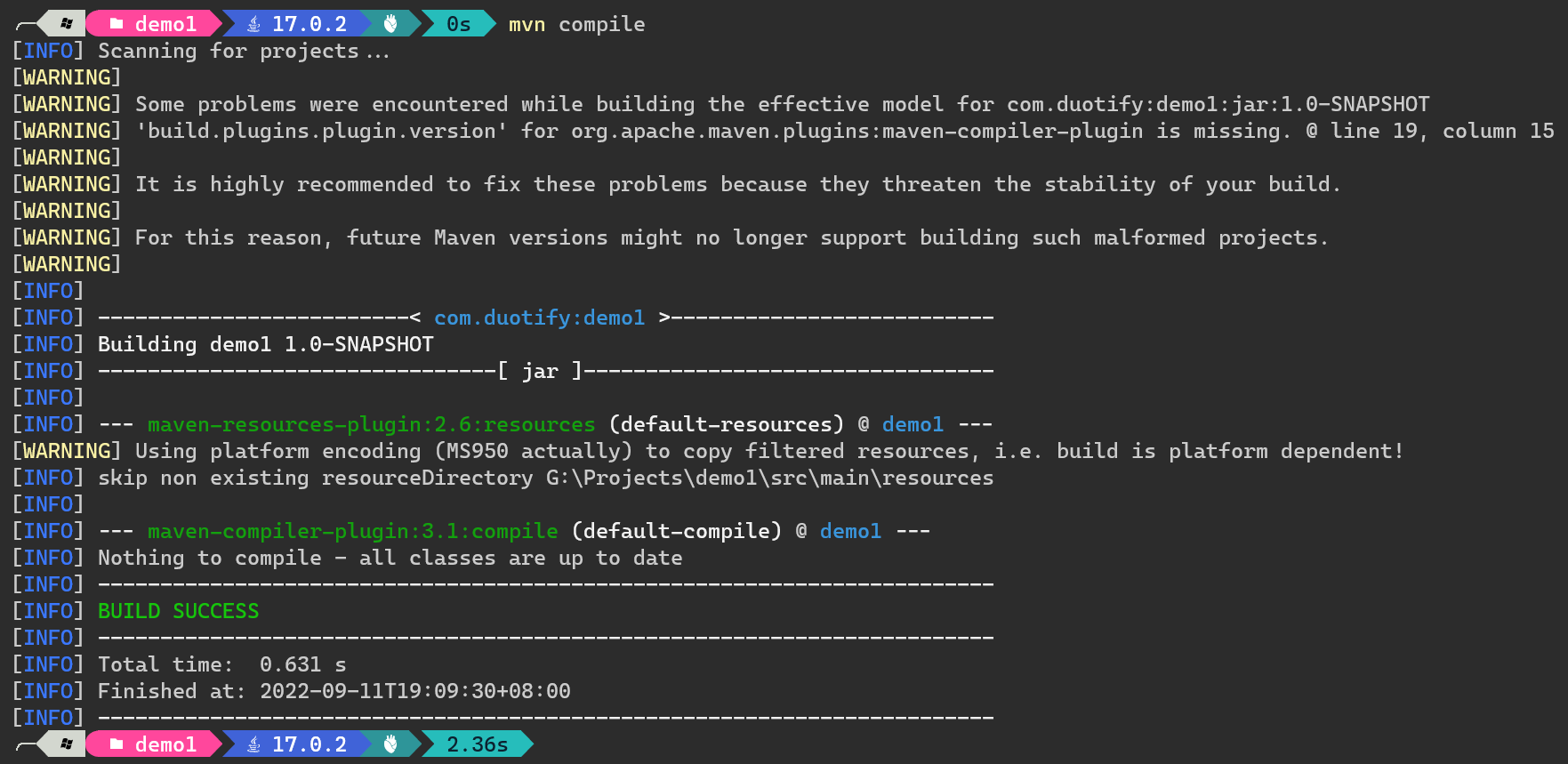
除了上述兩種方法外,還有一種直接透過 CLI 傳入 `-D` 指定 `maven.compiler.source` 與 `maven.compiler.target` 屬性的用法,也可以在執行時動態改變**編譯器版本**設定,詳見 [compiler:compile](https://maven.apache.org/plugins/maven-compiler-plugin/compile-mojo.html) 的 **Optional Parameters** 說明:
```bash
mvn clean compile '-Dmaven.compiler.source=8' '-Dmaven.compiler.target=8'
```
這個方法也可以通過編譯!
### 將應用程式封裝成 JAR 檔
最後,我想在多介紹 [Apache Maven JAR Plugin](https://maven.apache.org/plugins/maven-jar-plugin/),如果我們想要把應用程式打包成 JAR 檔,就需要用到這個內建的 plugin,以本文的範例來說,還需要對這個 plugin 做出一些調整才行。
你至少需要加入以下設定到 `pom.xml` 的 `` 底下:
```xml
org.apache.maven.plugins
maven-jar-plugin
true
com.duotify.App
```
> 注意: 其實 `org.apache.maven.plugins` 是可以省略的,因為 `org.apache.maven.plugins` 這個 `groupId` 是 Maven 的**預設值**。
然後執行以下 `mvn clean package` 命令即可產生 `target\demo1-1.0-SNAPSHOT.jar` 檔:
```bash
mvn clean package '-Dmaven.compiler.source=8' '-Dmaven.compiler.target=8'
```
接著就可以用以下命令直接測試執行:
```bash
java -jar target/demo1-1.0-SNAPSHOT.jar
```
### 總結
有了上述這個完整的例子,我相信你應該已經學會基本的 Maven Plugins 的運作架構與基本設定方法!👍
另外,你可以試試執行以下命令,他可以幫你找出你目前專案最終生效的 POM 檔完整內容,包含那些 Maven 內建的 POM 設定值,都會出現在執行結果中:
```bash
mvn help:effective-pom
```
> 上述命令事實上是執行 `help` plugin 的 `effective-pom` 目標(`goal`)!
你還可以利用以下命令,找出特定一個**階段**(`phase`)是哪些 plugins 有綁定**目標**(`goal`)
```bash
mvn help:describe -Dcmd=compile
```
他會顯示相當清楚的結果:
```
[INFO] 'compile' is a phase corresponding to this plugin:
org.apache.maven.plugins:maven-compiler-plugin:3.1:compile
It is a part of the lifecycle for the POM packaging 'jar'. This lifecycle includes the following phases:
* validate: Not defined
* initialize: Not defined
* generate-sources: Not defined
* process-sources: Not defined
* generate-resources: Not defined
* process-resources: org.apache.maven.plugins:maven-resources-plugin:2.6:resources
* compile: org.apache.maven.plugins:maven-compiler-plugin:3.1:compile
* process-classes: Not defined
* generate-test-sources: Not defined
* process-test-sources: Not defined
* generate-test-resources: Not defined
* process-test-resources: org.apache.maven.plugins:maven-resources-plugin:2.6:testResources
* test-compile: org.apache.maven.plugins:maven-compiler-plugin:3.1:testCompile
* process-test-classes: Not defined
* test: org.apache.maven.plugins:maven-surefire-plugin:2.12.4:test
* prepare-package: Not defined
* package: org.apache.maven.plugins:maven-jar-plugin:2.4:jar
* pre-integration-test: Not defined
* integration-test: Not defined
* post-integration-test: Not defined
* verify: Not defined
* install: org.apache.maven.plugins:maven-install-plugin:2.4:install
* deploy: org.apache.maven.plugins:maven-deploy-plugin:2.7:deploy
```
### 相關連結
- [Maven - Guide to Configuring Plug-ins](https://maven.apache.org/guides/mini/guide-configuring-plugins.html)
- [Maven - Available Plugins](https://maven.apache.org/plugins/index.html)
- [Apache Maven Compiler Plugin](https://maven.apache.org/plugins/maven-compiler-plugin/index.html)
- [Usage](https://maven.apache.org/plugins/maven-compiler-plugin/usage.html)
- [Goals](https://maven.apache.org/plugins/maven-compiler-plugin/plugin-info.html)
- [Pass Compiler Arguments](https://maven.apache.org/plugins/maven-compiler-plugin/examples/pass-compiler-arguments.html)
- [Setting the `-source` and `-target` of the Java Compiler](https://maven.apache.org/plugins/maven-compiler-plugin/examples/set-compiler-source-and-target.html)
- [Apache Maven JAR Plugin](https://maven.apache.org/plugins/maven-jar-plugin/index.html)
- [Usage](https://maven.apache.org/plugins/maven-jar-plugin/usage.html)
- [Goals](https://maven.apache.org/plugins/maven-jar-plugin/plugin-info.html)
- [Apache Maven Archiver](https://maven.apache.org/shared/maven-archiver/index.html)
- [Creating an Executable JAR File](https://maven.apache.org/shared/maven-archiver/examples/classpath.html)
- [Use Your Own Manifest File](https://maven.apache.org/shared/maven-archiver/examples/manifestFile.html)
- [Maven - Introduction to the Build Lifecycle](https://maven.apache.org/guides/introduction/introduction-to-the-lifecycle.html)
- [Maven - Plugin Developers Centre](https://maven.apache.org/plugin-developers/index.html)
- [Maven - POM Reference](https://maven.apache.org/pom.html)
- [Maven Goals and Phases | Baeldung](https://www.baeldung.com/maven-goals-phases)